CLI wrapper
Click Extra’s wrap subcommand runs any installed Click CLI through Click Extra, without modifying the target’s source code. Its main use is introspection: --params loads the target and describes it without running it, so you can inspect any Click CLI, yours or a third party’s. It also applies help colorization, useful for previewing how a third-party CLI would look with Click Extra’s keyword highlighting and themed styling, and --help-format renders the target as an artifact for a program or a build step.
Introspect any Click CLI
The --params flag turns wrap into a read-only inspector. It loads any Click CLI without running it, and prints a table of every parameter. Here is Flask’s run subcommand, its parameters listed with the spec a user types and the default each one falls back to:
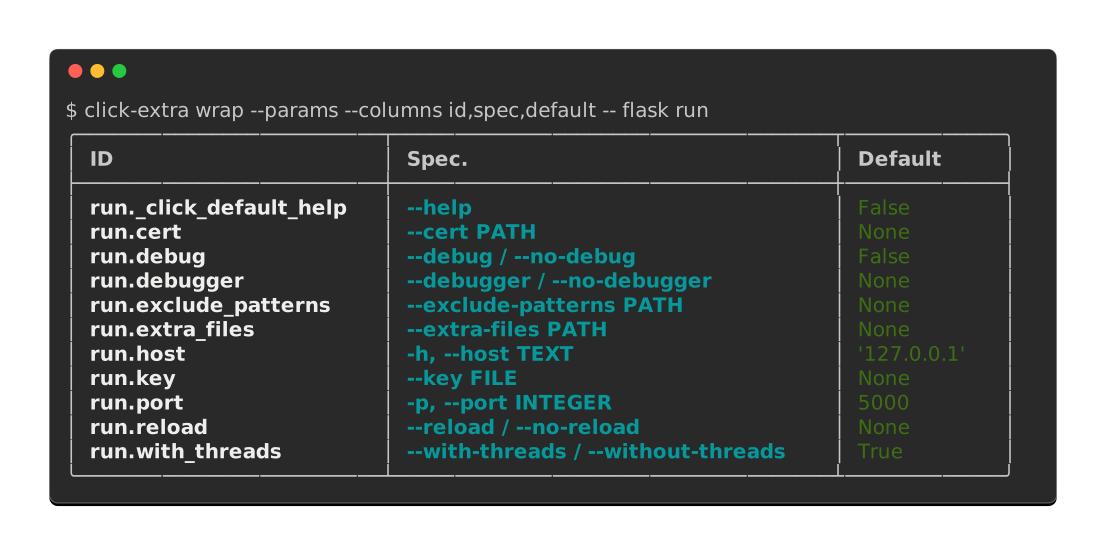
You can produce this table in your own terminal, without installing Click Extra:
$ uvx --with flask click-extra wrap --params --columns id,spec,default -- flask run
Each part of the command above:
--paramsintrospects the target instead of running it.--columns id,spec,defaultrestricts the table to each parameter’s ID, its command-line spec, and its default.--separates Click Extra’s options from the target CLI and its subcommand path.--with flaskpulls the target intouvx’s ephemeral environment, since the wrapper imports it in-process (see Dependencies of the wrapped CLI).
This is the main use case: answering questions about a CLI you did not write. The table shows the default of each parameter, the environment variables that reach it, and the options the help screen hides. All of it comes without reading the target’s source or running it. The same inspection serves your own CLI in a bug report or a support thread: paste the one-liner, and the reader sees your parameter surface exactly as Click parsed it.
Every introspection mode follows the same contract. Introspecting external CLIs below documents the full table, the value and source columns, and the --man, --tree and --help-format modes.
Usage
The wrap subcommand is the default when no known subcommand is given, so both forms work:
$ click-extra wrap -- flask --help
$ click-extra -- flask --help
$ click-extra wrap --help
Usage: click-extra wrap [OPTIONS] SCRIPT [ARGS]...
Aliases: run

  Run, or introspect, any Click CLI through Click Extra.

  By default, runs SCRIPT with keyword highlighting and themed styling for its
  help screens. The target CLI is not modified.

  With --params, --man, --tree or --help-format, SCRIPT is loaded and described
  without being run. The first three answer a question a person is asking right
  now; --help-format renders the target as an artifact for a program or a build
  step. Extra arguments after SCRIPT navigate into nested subcommands; for
  --params, any trailing options are replayed against the resolved command so
  the parameter table reports their value and source.

  Resolution order for SCRIPT: installed console_scripts entry point, a local
  project directory (its entry point is read from pyproject.toml or setup.cfg),
  Python file path, module:function notation, or Python module name.

Options:
  --params                Show the parameters of the target CLI and exit,
                          without running it.
  --man                   Read the manual page of the target CLI and exit,
                          without running it.
  --tree                  Show the tree of nested subcommands of the target CLI
                          and exit, without running it.
  --help-format [carapace|json|json-full|man|markdown|markdown-full]
                          Render the target CLI in the given format and exit,
                          without running it.
  --output-dir DIRECTORY  With --help-format, write the rendering into this
                          directory instead of printing it. Created if missing.
  --install               With --help-format, write the rendering where its
                          consumer looks for it instead of printing it, and echo
                          the written path.
  --table-format FORMAT   With --params, the rendering style of the parameter
                          table. Falls back to the click-extra group's --table-
                          format when not set here.  [default: rounded-outline]
  --columns COLUMNS       Restrict and reorder table columns, SQL SELECT-style.
                          Comma-separated list of column IDs. Default: all
                          columns in canonical order.
  -h, --help              Show this message and exit.

Examples:

  Run a CLI with Click Extra's colored help:
    $ click-extra wrap -- my-cli --help
  Read the help of one of its subcommands:
    $ click-extra wrap -- my-cli pick --help
  Report what a subcommand accepts, and where each value comes from:
    $ click-extra wrap --params -- my-cli pick
  Write a shell-completion spec where its consumer looks for it:
    $ click-extra wrap --help-format carapace --install -- my-cli
Tip
run is an alias for wrap, so you can also use:
$ click-extra run -- flask --help
Wrapping a Click CLI
Pass the target CLI name (or path) as the first argument. Everything after it is forwarded to the target:
$ click-extra -- flask --help
$ click-extra -- black --help
$ click-extra -- ./my_script.py --help
$ click-extra -- ../my-project --help
$ click-extra -- my_package.cli:main --help
Tip
Every example on this page uses the -- separator to visually split Click Extra’s own options from the target CLI and its arguments. It is optional (Click Extra stops parsing its own options at the first token it does not recognize), but using it consistently keeps the two sides of the invocation unambiguous:
$ click-extra --no-color -- flask --help
Flask prints its own help uncolored. Through the wrapper the same screen comes back themed, with the --debug reference in the description picked up by cross-reference highlighting:
$ click-extra wrap -- flask run --help
Usage: flask run [OPTIONS]

  Run a local development server.

  This server is for development purposes only. It does not provide the
  stability, security, or performance of production WSGI servers.

  The reloader and debugger are enabled by default with the '--debug' option.

Options:
  --debug / --no-debug        Set debug mode.
  -h, --host TEXT             The interface to bind to.
  -p, --port INTEGER          The port to bind to.
  --cert PATH                 Specify a certificate file to use HTTPS.
  --key FILE                  The key file to use when specifying a certificate.
  --reload / --no-reload      Enable or disable the reloader. By default the
                              reloader is active if debug is enabled.
  --debugger / --no-debugger  Enable or disable the debugger. By default the
                              debugger is active if debug is enabled.
  --with-threads / --without-threads
                              Enable or disable multithreading.
  --extra-files PATH          Extra files that trigger a reload on change.
                              Multiple paths are separated by ':'.
  --exclude-patterns PATH     Files matching these fnmatch patterns will not
                              trigger a reload on change. Multiple patterns are
                              separated by ':'.
  --help                      Show this message and exit.
Execution timing
The group-level --time flag measures the total execution time of the wrapped CLI, including import and patching overhead:
$ click-extra --time -- flask routes
Execution time: 0.342 seconds.
Color control
--color / --no-color controls whether ANSI codes are emitted, overriding whatever the target would have decided on its own. The default auto keeps colors for a terminal and drops them for a pipe or a file, so reach for --color=always when the destination is not a terminal but you want the styling anyway. The flag also respects environment variables like NO_COLOR, CLICOLOR, and FORCE_COLOR:
$ click-extra --color=always -- flask --help
$ click-extra --no-color -- flask --help
$ NO_COLOR=1 click-extra -- flask --help
The group-level --theme option selects a color preset for help screens. The flag is part of click-extra’s default options, so it works on every click-extra command:
$ click-extra --theme light -- flask --help
Custom themes can be registered with register_theme() before the CLI is parsed or declared inside the --config file (see Custom themes via config below). Either way the new name becomes a valid value for --theme for the duration of the invocation.
Tip
To keep what wrap renders, hand it to screenshot, which writes the colored help to an SVG or an HTML file. Its --wrap flag runs the pair for you: click-extra screenshot --output flask-help.svg --wrap -- flask --help.
Configuration
Click Extra’s configuration file support works alongside the wrapper. Group-level options like verbosity can be set in pyproject.toml:
[tool.click-extra]
verbosity = "DEBUG"
$ click-extra -- flask --help
debug: Set <Logger click_extra (DEBUG)> to DEBUG.
...
Defaults for the wrapped CLI
The [tool.click-extra.wrap.<script>] section sets persistent defaults for a specific target CLI. All keys are converted to CLI arguments and prepended to the target’s invocation:
[tool.click-extra.wrap.flask]
app = "myapp:create_app"
debug = true
$ click-extra -- flask routes
# Equivalent to: flask --app=myapp:create_app --debug routes
The section name must match the script name you pass on the command line. Multiple targets can each have their own section:
[tool.click-extra.wrap.flask]
app = "myapp:create_app"

[tool.click-extra.wrap.quart]
app = "otherapp:create_app"
Explicit CLI arguments always override config values:
$ click-extra -- flask --app otherapp routes
# CLI --app wins over config
Invalid option names are caught by the target CLI itself with standard Click error messages, so typos are surfaced immediately.
Custom themes via config
The --config flag also accepts theme overrides and brand-new theme definitions. Drop a [tool.click-extra.themes.<name>] table into the same pyproject.toml and the new palette is loaded before --theme is validated, so it can be selected on the command line or pinned via theme = "...":
[tool.click-extra]
theme = "midnight"

# Override one slot of the built-in `dark` theme:
[tool.click-extra.themes.dark]
option = { fg = "bright_cyan" }

# Define a fresh palette named "midnight":
[tool.click-extra.themes.midnight]
option = { fg = "blue", bold = true }
heading = { fg = "magenta" }
choice = { fg = "yellow" }
$ click-extra --help
# --theme [dark|dracula|light|manpage|midnight|monokai|nord|solarized-dark]
$ click-extra -- flask --help     # rendered with the "midnight" palette
Themes loaded this way live on ctx.meta for the current invocation only. The module-level theme_registry is never mutated, so back-to-back wraps in the same process don’t cross-contaminate. See Themes from your --config file for the full schema and the validation behavior.
Script resolution
SCRIPT is accepted in five forms, tried in this order:
A
console_scriptsentry point exposed by an installed package, the most common case:$ click-extra wrap -- flask --help
A local project directory. Its console-script entry point is read from
pyproject.toml([project.scripts]) orsetup.cfg(console_scripts), and the directory holding its top-level package is added tosys.pathso it imports without an install step. This is handy for a checked-out project sitting next to your own:$ click-extra wrap -- ../my-project --help
Both the flat layout (the package at the project root) and the src layout (under
src/) are detected. When several scripts point at different targets, pass the right one withmodule:functionnotation; the error lists the candidates. Adding the directory tosys.pathmakes its package importable, but it does not install the project’s dependencies, so see Dependencies of the wrapped CLI below.A
.pyfile path. The file is imported in place, with no install step required:$ click-extra wrap -- path/to/my_cli.py --help
module:functionnotation pointing straight at a Click command object. Useful when the entry point is a wrapper rather than the command itself, or when the command isn’t exposed as a console script at all:$ click-extra wrap -- flask.cli:cli --help
A bare Python module name invocable via
python -m. The resolver imports the module and picks up the Click command from its top-level attributes:$ click-extra wrap -- my_package.cli --help
The same resolver backs every wrap mode, including --params and --man.
Dependencies of the wrapped CLI
wrap runs the target inside Click Extra’s own interpreter: it imports the resolved module and calls it in-process (see Script resolution). The target is never installed into a separate environment, so every third-party package the target imports must already be importable where wrap runs, exactly as if you had launched the target directly.
This bites hardest when wrapping a project directory. Pointing wrap at a checked-out project makes its package importable by putting it on sys.path, but it does not install that project’s declared dependencies. If the target’s CLI imports a package that is absent, the failure surfaces from the target’s own code:
$ click-extra wrap -- ../weather-cli --help
...
ModuleNotFoundError: No module named 'httpx'
A traceback like this means resolution already succeeded and the target started running: the missing module is a dependency of the target, not of Click Extra. It is the same error a direct python -m weather_cli would raise.
The lightest fix is to layer the missing packages onto an ephemeral run with uv, one --with per dependency:
$ uv run --with httpx click-extra wrap -- ../weather-cli --help
Alternatively, run wrap from an environment that already has the target and its dependencies installed (the target’s own virtualenv, for example).
Ephemeral wrapping with uvx
The wrapper pairs well with uvx for one-shot colorization of any Click CLI without permanently installing Click Extra. The ephemeral environment holds only Click Extra, so the target and anything it imports have to be pulled in with --with (see Dependencies of the wrapped CLI above):
$ uvx --with flask click-extra -- flask --help
$ uvx --with black click-extra -- black --help
A CLI already built with Click Extra or Cloup passes through unchanged: it brings its own help formatting, and the wrapper leaves that alone while still running it. What the wrapper patches into Click on the way, and why it does so in two places, is documented on click_extra.cli_wrapper.patch_click().
Introspecting external CLIs
The --params flag turns wrap into a read-only inspector: it loads any Click CLI without running it and prints a table of every parameter, with its ID, spec, class, type, hidden status, environment variables, and default value. This is the same table the --params option produces for a Click Extra CLI, pointed at a foreign target instead.
The other introspection modes follow the same contract, each documented on its facet’s page: --man reads the target’s manual, --tree prints its hierarchy of nested subcommands, and --help-format renders it as JSON, Markdown, roff or a Carapace spec. All four are mutually exclusive.
$ click-extra wrap --help
Usage: click-extra wrap [OPTIONS] SCRIPT [ARGS]...
Aliases: run

  Run, or introspect, any Click CLI through Click Extra.

  By default, runs SCRIPT with keyword highlighting and themed styling for its
  help screens. The target CLI is not modified.

  With --params, --man, --tree or --help-format, SCRIPT is loaded and described
  without being run. The first three answer a question a person is asking right
  now; --help-format renders the target as an artifact for a program or a build
  step. Extra arguments after SCRIPT navigate into nested subcommands; for
  --params, any trailing options are replayed against the resolved command so
  the parameter table reports their value and source.

  Resolution order for SCRIPT: installed console_scripts entry point, a local
  project directory (its entry point is read from pyproject.toml or setup.cfg),
  Python file path, module:function notation, or Python module name.

Options:
  --params                Show the parameters of the target CLI and exit,
                          without running it.
  --man                   Read the manual page of the target CLI and exit,
                          without running it.
  --tree                  Show the tree of nested subcommands of the target CLI
                          and exit, without running it.
  --help-format [carapace|json|json-full|man|markdown|markdown-full]
                          Render the target CLI in the given format and exit,
                          without running it.
  --output-dir DIRECTORY  With --help-format, write the rendering into this
                          directory instead of printing it. Created if missing.
  --install               With --help-format, write the rendering where its
                          consumer looks for it instead of printing it, and echo
                          the written path.
  --table-format FORMAT   With --params, the rendering style of the parameter
                          table. Falls back to the click-extra group's --table-
                          format when not set here.  [default: rounded-outline]
  --columns COLUMNS       Restrict and reorder table columns, SQL SELECT-style.
                          Comma-separated list of column IDs. Default: all
                          columns in canonical order.
  -h, --help              Show this message and exit.

Examples:

  Run a CLI with Click Extra's colored help:
    $ click-extra wrap -- my-cli --help
  Read the help of one of its subcommands:
    $ click-extra wrap -- my-cli pick --help
  Report what a subcommand accepts, and where each value comes from:
    $ click-extra wrap --params -- my-cli pick
  Write a shell-completion spec where its consumer looks for it:
    $ click-extra wrap --help-format carapace --install -- my-cli
Here is Flask’s run subcommand rendered with the vertical table format:
$ click-extra wrap --params --table-format vertical -- flask run
***************************[ 1. row ]***************************
ID                  | run._click_default_help
Spec.               | --help
Class               | click.core.Option
Param type          | click.types.BoolParamType
Python type         | bool
Hidden              | ✘
Exposed             | ✘
Env. vars.          | FLASK_RUN__CLICK_DEFAULT_HELP
Default             | False
Is flag             | ✓
Flag value          | True
Is bool flag        | ✓
Multiple            | ✘
Nargs               | 1
Prompt              |
Confirmation prompt | ✘
Value               | None
Source              |
***************************[ 2. row ]***************************
ID                  | run.cert
Spec.               | --cert PATH
Class               | click.core.Option
Param type          | flask.cli.CertParamType
Python type         | str
Hidden              | ✘
Exposed             | ✓
Env. vars.          | FLASK_RUN_CERT
Default             | None
Is flag             | ✘
Flag value          |
Is bool flag        | ✘
Multiple            | ✘
Nargs               | 1
Prompt              |
Confirmation prompt | ✘
Value               | None
Source              |
***************************[ 3. row ]***************************
ID                  | run.debug
Spec.               | --debug / --no-debug
Class               | click.core.Option
Param type          | click.types.BoolParamType
Python type         | bool
Hidden              | ✘
Exposed             | ✘
Env. vars.          | FLASK_RUN_DEBUG
Default             | False
Is flag             | ✓
Flag value          | True
Is bool flag        | ✓
Multiple            | ✘
Nargs               | 1
Prompt              |
Confirmation prompt | ✘
Value               | None
Source              |
***************************[ 4. row ]***************************
ID                  | run.debugger
Spec.               | --debugger / --no-debugger
Class               | click.core.Option
Param type          | click.types.BoolParamType
Python type         | bool
Hidden              | ✘
Exposed             | ✓
Env. vars.          | FLASK_RUN_DEBUGGER
Default             | None
Is flag             | ✓
Flag value          | True
Is bool flag        | ✓
Multiple            | ✘
Nargs               | 1
Prompt              |
Confirmation prompt | ✘
Value               | None
Source              |
***************************[ 5. row ]***************************
ID                  | run.exclude_patterns
Spec.               | --exclude-patterns PATH
Class               | click.core.Option
Param type          | flask.cli.SeparatedPathType
Python type         | str
Hidden              | ✘
Exposed             | ✓
Env. vars.          | FLASK_RUN_EXCLUDE_PATTERNS
Default             | None
Is flag             | ✘
Flag value          |
Is bool flag        | ✘
Multiple            | ✘
Nargs               | 1
Prompt              |
Confirmation prompt | ✘
Value               | None
Source              |
***************************[ 6. row ]***************************
ID                  | run.extra_files
Spec.               | --extra-files PATH
Class               | click.core.Option
Param type          | flask.cli.SeparatedPathType
Python type         | str
Hidden              | ✘
Exposed             | ✓
Env. vars.          | FLASK_RUN_EXTRA_FILES
Default             | None
Is flag             | ✘
Flag value          |
Is bool flag        | ✘
Multiple            | ✘
Nargs               | 1
Prompt              |
Confirmation prompt | ✘
Value               | None
Source              |
***************************[ 7. row ]***************************
ID                  | run.host
Spec.               | -h, --host TEXT
Class               | click.core.Option
Param type          | click.types.StringParamType
Python type         | str
Hidden              | ✘
Exposed             | ✓
Env. vars.          | FLASK_RUN_HOST
Default             | '127.0.0.1'
Is flag             | ✘
Flag value          |
Is bool flag        | ✘
Multiple            | ✘
Nargs               | 1
Prompt              |
Confirmation prompt | ✘
Value               | None
Source              |
***************************[ 8. row ]***************************
ID                  | run.key
Spec.               | --key FILE
Class               | click.core.Option
Param type          | click.types.Path
Python type         | str
Hidden              | ✘
Exposed             | ✘
Env. vars.          | FLASK_RUN_KEY
Default             | None
Is flag             | ✘
Flag value          |
Is bool flag        | ✘
Multiple            | ✘
Nargs               | 1
Prompt              |
Confirmation prompt | ✘
Value               | None
Source              |
***************************[ 9. row ]***************************
ID                  | run.port
Spec.               | -p, --port INTEGER
Class               | click.core.Option
Param type          | click.types.IntParamType
Python type         | int
Hidden              | ✘
Exposed             | ✓
Env. vars.          | FLASK_RUN_PORT
Default             | 5000
Is flag             | ✘
Flag value          |
Is bool flag        | ✘
Multiple            | ✘
Nargs               | 1
Prompt              |
Confirmation prompt | ✘
Value               | None
Source              |
***************************[ 10. row ]***************************
ID                  | run.reload
Spec.               | --reload / --no-reload
Class               | click.core.Option
Param type          | click.types.BoolParamType
Python type         | bool
Hidden              | ✘
Exposed             | ✓
Env. vars.          | FLASK_RUN_RELOAD
Default             | None
Is flag             | ✓
Flag value          | True
Is bool flag        | ✓
Multiple            | ✘
Nargs               | 1
Prompt              |
Confirmation prompt | ✘
Value               | None
Source              |
***************************[ 11. row ]***************************
ID                  | run.with_threads
Spec.               | --with-threads / --without-threads
Class               | click.core.Option
Param type          | click.types.BoolParamType
Python type         | bool
Hidden              | ✘
Exposed             | ✓
Env. vars.          | FLASK_RUN_WITH_THREADS
Default             | True
Is flag             | ✓
Flag value          | True
Is bool flag        | ✓
Multiple            | ✘
Nargs               | 1
Prompt              |
Confirmation prompt | ✘
Value               | None
Source              |
Because wrap resolves the target’s own context, the auto-generated environment variables resolve too (Flask sets the FLASK_ prefix, so --port reads FLASK_RUN_PORT):
$ click-extra wrap --params --table-format vertical --columns id,envvars -- flask run
***************************[ 1. row ]***************************
ID         | run._click_default_help
Env. vars. | FLASK_RUN__CLICK_DEFAULT_HELP
***************************[ 2. row ]***************************
ID         | run.cert
Env. vars. | FLASK_RUN_CERT
***************************[ 3. row ]***************************
ID         | run.debug
Env. vars. | FLASK_RUN_DEBUG
***************************[ 4. row ]***************************
ID         | run.debugger
Env. vars. | FLASK_RUN_DEBUGGER
***************************[ 5. row ]***************************
ID         | run.exclude_patterns
Env. vars. | FLASK_RUN_EXCLUDE_PATTERNS
***************************[ 6. row ]***************************
ID         | run.extra_files
Env. vars. | FLASK_RUN_EXTRA_FILES
***************************[ 7. row ]***************************
ID         | run.host
Env. vars. | FLASK_RUN_HOST
***************************[ 8. row ]***************************
ID         | run.key
Env. vars. | FLASK_RUN_KEY
***************************[ 9. row ]***************************
ID         | run.port
Env. vars. | FLASK_RUN_PORT
***************************[ 10. row ]***************************
ID         | run.reload
Env. vars. | FLASK_RUN_RELOAD
***************************[ 11. row ]***************************
ID         | run.with_threads
Env. vars. | FLASK_RUN_WITH_THREADS
Restricting columns
Pass --columns a comma-separated list of column IDs to restrict and reorder the table, SQL SELECT-style. The opening example selects id,spec,default; reordered, the same table runs spec first:
$ click-extra wrap --params --columns spec,id,default -- flask run
╭────────────────────────────────────┬─────────────────────────┬─────────────╮
│ Spec.                              │ ID                      │ Default     │
├────────────────────────────────────┼─────────────────────────┼─────────────┤
│ --cert PATH                        │ run.cert                │ None        │
│ --debug / --no-debug               │ run.debug               │ False       │
│ --debugger / --no-debugger         │ run.debugger            │ None        │
│ --exclude-patterns PATH            │ run.exclude_patterns    │ None        │
│ --extra-files PATH                 │ run.extra_files         │ None        │
│ --help                             │ run._click_default_help │ False       │
│ --key FILE                         │ run.key                 │ None        │
│ --reload / --no-reload             │ run.reload              │ None        │
│ --with-threads / --without-threads │ run.with_threads        │ True        │
│ -h, --host TEXT                    │ run.host                │ '127.0.0.1' │
│ -p, --port INTEGER                 │ run.port                │ 5000        │
╰────────────────────────────────────┴─────────────────────────┴─────────────╯
Reading values and their source
Any options after SCRIPT (and its subcommand path) are replayed against the resolved command, so the value and source columns report what each parameter would resolve to under those arguments:
$ click-extra wrap --params --columns id,value,source -- flask run --port 8080
╭─────────────────────────┬─────────────┬─────────────╮
│ ID                      │ Value       │ Source      │
├─────────────────────────┼─────────────┼─────────────┤
│ run._click_default_help │ False       │ DEFAULT     │
│ run.cert                │ None        │ DEFAULT     │
│ run.debug               │ False       │ DEFAULT     │
│ run.debugger            │ None        │ DEFAULT     │
│ run.exclude_patterns    │ None        │ DEFAULT     │
│ run.extra_files         │ None        │ DEFAULT     │
│ run.host                │ '127.0.0.1' │ DEFAULT     │
│ run.key                 │ None        │ DEFAULT     │
│ run.port                │ '8080'      │ COMMANDLINE │
│ run.reload              │ None        │ DEFAULT     │
│ run.with_threads        │ True        │ DEFAULT     │
╰─────────────────────────┴─────────────┴─────────────╯
Machine-readable output
Everything the wrapper can extract from a target, as data a program reads rather than a screen a person does, is collected in machine-readable help: the parameter inventory in any structured format, and the command itself as JSON, Markdown, a man page or a Carapace spec.
Subcommand drilling
Extra arguments after SCRIPT navigate into nested command groups; the table then scopes to the resolved node:
$ click-extra wrap --params -- flask run
$ click-extra wrap --params -- flask routes
Target resolution
Target resolution follows the same order as the default mode: a console_scripts entry point, a local project directory, a .py file path, module:function notation, or a bare Python module name.
When the resolved entry point is a wrapper function (not a Click command), the module is scanned for Click command instances. If a single command group is found, it is used automatically. If multiple candidates exist, the error message lists them so you can use explicit module:name notation:
$ click-extra wrap --params -- flask.cli:cli
Some CLIs import their Click command lazily: a __main__:main wrapper that runs from my_package.cli import cli only when called, for instance. The module scan then finds nothing at the top level and wrap reports No Click command found in my_package.__main__. Introspection cannot recover the command from such an entry point, nor from the project directory that resolves to it, because running the wrapper is the only thing that would import the command. Point it instead at the module that defines the command with module:function notation, making the package importable if it is not installed:
$ PYTHONPATH=../my-project click-extra wrap --man -- my_package.cli:cli
click_extra.cli_wrapper API
        classDiagram
  Command <|-- _WrapCommand
  Group <|-- WrapperGroup
  _HelpColorsMixin <|-- _WrapCommand
The click-extra wrap command and the machinery to wrap a foreign Click CLI.
Monkey-patches Click’s decorator functions before importing (or running) a
target module so its @click.command() / @click.group() produce
colorized, keyword-highlighted, themed variants. Also resolves and invokes the
target, and introspects it for --params, --man and --tree
without firing its callbacks.
Not to be confused with text wrapping: that is click.wrap_text(), exposed
at the package root as click_extra.wrap_text.
- class click_extra.cli_wrapper.WrapperGroup(*args, help_command=True, sort_subcommands=None, subcommand_priorities=None, **kwargs)[source]
Bases:
GroupGroup that falls back to the
wrapsubcommand for unknown names.Known subcommands and their aliases are dispatched normally. Anything else is treated as a target script and forwarded to
wrap.Like
Command.__init__, but auto-injects ahelpsubcommand.- Parameters:
help_command (
bool) – whenTrue(the default), ahelpsubcommand is automatically registered. Set toFalseto suppress it, or register your ownhelpsubcommand to override it.sort_subcommands (
bool|None) – how subcommands sharing a priority are broken apart.Truelists them alphabetically,Falsein the order they were registered.None(the default) defers to thesort_subcommandscontext setting, then toTrue. Seemust_sort_subcommands().subcommand_priorities (
Mapping[str,float] |None) – maps a subcommand name to its priority relative toDEFAULT_PRIORITY, lowest listed first. Names left out keep the default priority, so numbering a few subcommands moves only those.
- click_extra.cli_wrapper.patch_click(theme=None, color=True)[source]
Replace Click’s decorator functions with colorized variants.
Must be called before importing the target CLI module so that
@click.command()and@click.group()decorators produce colorized commands.Note
Only the decorator functions are replaced, not the class names (
click.Command,click.Group). Replacing class names would breakisinstanceandissubclasschecks in Click internals (_param_memo) and Cloup’s decorator validators.Note
A decided color (anything but
None) is pinned in two places, because the two kinds of target are colorized by different routes. One built with a plain@click.command()picks up the patched decorator and therefore is a_HelpColorsMixin: the context class installed below carries the decision for it. One carrying an explicitcls=(like Flask’sFlaskGroup) keeps its own class and a stockclick.Context, and is served by theget_helppatch further down instead. Cover a single route and the flag silently works for half the CLIs in the wild, which is what--color=alwaysdid until it was pinned here too.
- click_extra.cli_wrapper.unpatch_click()[source]
Restore Click’s original decorator functions and methods.
Reverses the changes made by
patch_click(). Useful in tests to avoid leaking global state between test cases.- Return type:
- click_extra.cli_wrapper.resolve_target(script)[source]
Resolve a script name to a module path and function name.
Resolution order:
console_scriptsentry points from installed packages.A local project directory: its
console_scriptsentry point is read frompyproject.toml/setup.cfgand its package is added tosys.path..pyfile path.Explicit
module:functionnotation.Bare Python module or package name.
- Return type:
- Returns:
(module_path, function_name)tuple. function_name is empty when the target should be invoked as a module or script file.- Raises:
click.ClickException – If the script cannot be resolved.
Note
Resolving a local project directory has a side effect: the directory holding its top-level package is prepended to
sys.pathso the subsequent import succeeds. The target’s own dependencies must still be importable in the current environment.
- click_extra.cli_wrapper.invoke_target(script, module_path, function_name, args)[source]
Import and call the target CLI.
Reconstructs
sys.argvso Click’s argument parsing sees the target’s program name and arguments, and pins__main__.__package__so the program name Click detects is that same script name.Note
A target whose Click command is invoked without an explicit
prog_namefalls back toclick.utils._detect_program_name(), which reads__main__.__package__. That attribute states how click-extra itself was launched: a documentation build runningpython -m sphinxleakedpython -m sphinx.flaskinto a wrapped usage line, andpython -m click_extraleakspython -m click_extra.flaskthe same way. Emptying it for the call pins the detection on its file-execution branch, which answers the basename ofsys.argv[0]: the script name set above.
- click_extra.cli_wrapper.resolve_target_command(script, subcommands=())[source]
Import SCRIPT and return its Click command object and a matching context.
Resolves SCRIPT through
resolve_target(), imports the module, then obtains the command object without running the CLI: the entry-point attribute when it is itself a command, otherwise by scanning the module’s namespace for Click command instances (preferring groups). Optionalsubcommandsnavigate into nested groups, mirroring the path a user would type.Shared by the
wrapcommand’s introspection modes (--params,--man,--carapace,--tree) so all describe the exact same resolved command.- Raises:
click.ClickException – when no unambiguous Click command can be found, or a requested subcommand does not exist.
- Return type:
- click_extra.cli_wrapper.target_prog_name(script, command)[source]
Return the name a user would type to run SCRIPT.
Every rendering of a target is titled with this: a man page’s
.THline, a Carapace spec’sname, a Markdown heading, the root of a--tree. None of them wants the string that was typed to reach the command, which is a filesystem path or a dotted import path as often as it is a command name.Three shapes, in the order they are distinguished:
A path (a separator, or a
.pysuffix): its basename, dropping that suffix.path/to/my_cli.pyis run asmy_cli, not as its own path.A dotted or colon-separated import path: the command’s own name, which Click took from the function or an explicit
name=. An import path names a module, never a binary.Anything else is a console-script name, already exactly what a user types, and beats the command’s own name when the two differ (Flask’s entry point is
flask, its group object is namedcli).
Caution
Case 2 is a best effort. A target reached as
python -m my_package.clihas no single name a user types, so the command’s own is the closest thing to one. Pass an explicitprog_nameto the underlying renderer when that is not what you want in the output.- Return type:
- click_extra.cli_wrapper.WRAP_EPILOG = "\x08\nExamples:\n\n\x08\n Run a CLI with Click Extra's colored help:\n $ click-extra wrap -- my-cli --help\n\n\x08\n Read the help of one of its subcommands:\n $ click-extra wrap -- my-cli pick --help\n\n\x08\n Report what a subcommand accepts, and where each value comes from:\n $ click-extra wrap --params -- my-cli pick\n\n\x08\n Write a shell-completion spec where its consumer looks for it:\n $ click-extra wrap --help-format carapace --install -- my-cli\n"
Sample invocations closing the
wraphelp screen.