CLI screenshots
You can produce this screenshot of a git diff:
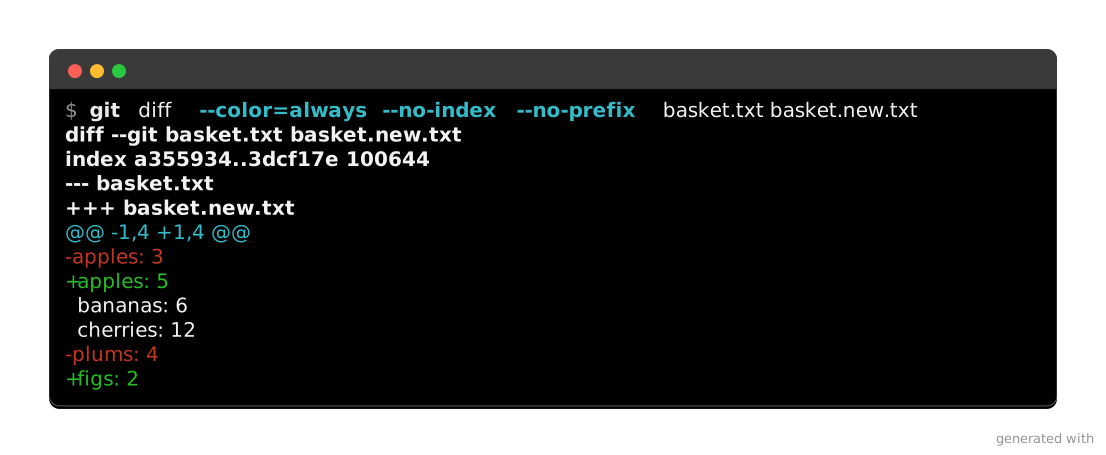
By invoking click-extra screenshot in your terminal, without installing it:
$ uvx click-extra screenshot --output git-diff.svg --preset macos -- git diff --color=always --no-index basket.txt basket.new.txt
The screenshot is written to an SVG file, where:
--output git-diff.svgnames the file to write.--preset macossets the window’s chrome to the macOS style.--separates those options from the command to capture.--color=alwayskeepsgitprinting colors even though its output is a pipe.--no-indexletsgit diffcompare two plain files instead of a repository.
Capture a command
The screenshot command
click-extra screenshot runs a command and writes its colored output to a file. Use -- to separate the screenshot options from the command’s own options:
$ click-extra screenshot --output cli-help.svg -- my-cli --help
$ click-extra screenshot --help
Usage: click-extra screenshot [OPTIONS] COMMAND_LINE...

  Capture a command's colored output and write it as an image or HTML.

  Runs COMMAND_LINE with colors forced on and its terminal width pinned, then
  writes the captured output where --output points. Its extension picks the
  format:

  - .svg: a picture of a terminal window, for a surface that strips inline
  HTML. A README on GitHub or PyPI has no other option;

  - .html: selectable, searchable, copy-pasteable text, for a page you own.

  Put -- before the command line so its own options are not mistaken for this
  command's:

    click-extra screenshot --output shot.svg -- my-cli --help

  COMMAND_LINE is anything the shell can run, Click CLI or not. A Click CLI not
  built on Click Extra prints its help uncolored, so --wrap routes it through
  the wrap subcommand first and captures the colored rendering.

  An SVG starts each run of text on its own column, so it renders correctly
  outside a web browser, where a file manager, a git client or a thumbnailer
  would otherwise slide the columns out of place.

  Neither format needs an optional dependency.

  --record runs the command under a pseudo-terminal instead, and writes an
  animated SVG of every screen it drew: the frames a spinner or a progress bar
  asks a terminal for, which a plain capture never sees. The invocation is drawn
  above every frame, and the loop pauses on the final screen for as long as its
  line count asks, see --hold.

Options:
  --output FILE                Path of the file to write. Its extension picks
                               the format: .svg for an image, .html for
                               selectable text, .ansi for the escape sequences
                               themselves. Pass - to print those to the
                               terminal, which draws no window.  [required]
  --columns [auto|INTEGER]     Terminal width, in characters, the command wraps
                               its output to and the image is laid out at. Pass
                               auto to pin neither: the command finds its own
                               width, and the image is laid out at the longest
                               line it printed, so nothing folds inside the
                               picture.  [default: 80]
  --background [dark|light]    Terminal chrome the capture is drawn on, and the
                               palette its colors resolve against. Match it to
                               the theme the captured CLI renders with: a light-
                               background theme washes out on the dark default.
                               [default: dark]
  --preset [linux|macos|plain|windows]
                               Terminal to draw the capture as: its window
                               decorations, palette, font and prompt sigil.
                               Anything stated alongside wins over it. Left out,
                               the capture keeps the renderer's own neutral
                               window.
  --border COLOR               Color of the frame drawn around the terminal
                               window, as CSS names it. Pass none to draw no
                               frame. Defaults to the one the chrome can show.
  --border-width PIXELS        Thickness of that frame, in pixels.  [default: 1;
                               x>=0]
  --radius PIXELS              How round the window's corners are, in pixels.
                               Zero squares them. Defaults to 8, or to the
                               rounding --preset terminal draws.  [x>=0]
  --backdrop COLOR             Color filling the image behind the window, margin
                               included, as CSS names it. Left transparent by
                               default, so the page shows through.  [default:
                               none]
  --shadow COLOR               Color of the drop shadow lifting the window off
                               the page, as CSS names it. Pass none to draw no
                               shadow. Defaults to the one the chrome calls for.
  --margin PIXELS              Transparent pixels left around the window, on all
                               four sides. The room the drop shadow falls into,
                               so a capture drawing one wants some.  [default:
                               48; x>=0]
  --padding PIXELS             Pixels added inside the window, around the drawn
                               text, on top of the few the renderer adds on its
                               own.  [default: 8; x>=0]
  --opacity FLOAT RANGE        How solid the window's body is. Under 1 it turns
                               see-through, the way a terminal set to
                               transparency does: whatever the capture sits on
                               shows through it, while its text, frame and title
                               bar keep their own paint.  [default: 1.0;
                               0<=x<=1]
  --watermark TEXT             Credit line drawn in the image's bottom-right
                               corner, in the margin around the window. Pass an
                               empty string to draw none, or your own text to
                               credit your project instead.  [default: generated
                               with click-extra 9.5.1]
  --watermark-color COLOR      Color that credit line is drawn in, as CSS names
                               it, alpha included. Defaults to a neutral gray:
                               the line sits in the transparent margin, so it
                               answers to the page embedding the image rather
                               than to the chrome.
  --head INTEGER RANGE         Keep only the first N lines.  [x>=1]
  --tail INTEGER RANGE         Keep only the last N lines.  [x>=1]
  --truncation [auto|TEXT]     Line standing in for what --head or --tail cut
                               away, or auto to rule one across the width the
                               kept lines span.  [default: auto]
  --line-numbers               Number the drawn lines in a gutter, the way
                               Pygments does inline. Line 1 is the first line
                               the picture shows.
  --emphasize-lines LINES      Draw a band behind the lines named, as 2,4-5.
                               Counted from 1 as the picture draws them. Ranges
                               are closed: state both ends.
  --title TEXT                 Caption drawn in an SVG's window chrome, or an
                               HTML document's title.  [default: ""]
  --fragment                   For HTML, emit the bare block instead of a
                               standalone document, to paste into a page that
                               has its own.
  --prompt TEXT                Command line to display above the output, when it
                               differs from the one that is run. Pass an empty
                               string to draw no prompt at all. Defaults to the
                               command line itself.
  --merge-stderr               Fold the command's stderr into the capture, for a
                               CLI printing its help there. Off by default,
                               which is what keeps a wrapper's build chatter out
                               of the image.
  --wrap                       Route COMMAND_LINE through the wrap subcommand,
                               so a Click CLI that is not built on Click Extra
                               is captured with its colors. Only works on a
                               target wrap can resolve.
  --timeout SECONDS            Seconds before the command is killed. Waits
                               forever by default. With --record, this is also
                               where the recording stops.  [x>0]
  --record                     Run the command under a pseudo-terminal and write
                               an animated SVG of the screens it draws, spinners
                               and progress bars included. Needs an .svg
                               --output and a numeric --columns. Unix only.
  --rows INTEGER RANGE         With --record, the height of the terminal the
                               command runs in, in characters. Defaults to 24.
                               [x>=1]
  --hold [auto|FLOAT]          With --record, extra seconds the last frame stays
                               up before the animation starts over, or auto to
                               scale them to that frame's line count. Defaults
                               to auto.
  --blank SECONDS              With --record, seconds of empty screen closing
                               the cycle. Defaults to 0.6.  [x>=0]
  --cursor [auto|block|bar|underline]
                               Draw a terminal cursor where the command left it.
                               Bare, it takes the shape the --preset terminal
                               draws; name one to override that. Omitted, no
                               cursor is drawn.
  --blink SECONDS              With --cursor, seconds one blink takes. Pass 0 to
                               draw a steady cursor. Defaults to 1.0.  [x>=0]
  --closing-prompt / --no-closing-prompt
                               Draw the shell's prompt on the row under the
                               output, where it comes back once the command
                               exits. Costs no height alongside --cursor, which
                               already leaves that row for the cursor to wait
                               on.  [default: no-closing-prompt]
  --typing SECONDS             With --record, open the animation by typing the
                               command line out, this many seconds per
                               character. Omitted, the prompt stands there from
                               the first frame.  [x>0]
  --submit SECONDS             With --typing, seconds the finished command line
                               waits before its output starts. Defaults to 0.4.
                               [x>0]
  --speed FLOAT RANGE          With --record, how much faster to play than
                               recorded: 2 halves every frame's time. Defaults
                               to 1.0.  [x>0]
  -h, --help                   Show this message and exit.

Configuration options:
  --config LOCATION            Location of the configuration file. Supports
                               local path with glob patterns or remote URL.
                               [default: ~/.config/click-extra/]
  --no-config                  Ignore all configuration files and only use
                               command line parameters and environment
                               variables.
  --validate-config LOCATION   Validate the configuration file and exit.
  --export-config FORMAT       Export the configuration in the selected format
                               to <stdout>, then exit.

Output options:
  --accessible                 Accessibility mode: disable colors and render
                               tables in a borderless, screen-reader-friendly
                               format.
  --color [auto|always|never]  Colorize the output. A bare --color is the same
                               as --color=always.  [default: auto]
  --no-color                   Disable colorization (alias of --color=never).
  --progress / --no-progress   Show progress indicators during long operations.
                               Disabled for non-interactive output (pipes, dumb
                               terminals, CI) and by --accessible.  [default:
                               progress]
  --theme [auto|dark|dracula|light|manpage|monokai|nord|solarized-dark]
                               Color theme used for help screens.  [default:
                               dark]
  --table-format FORMAT        Rendering style of tables.  [default: rounded-
                               outline]

Logging options:
  --verbosity LEVEL            Either CRITICAL, ERROR, WARNING, INFO, DEBUG.
                               [default: WARNING]
  -v, --verbose                Increase the default WARNING verbosity by one
                               level for each additional repetition of the
                               option.  [default: 0]
  -q, --quiet                  Decrease the default WARNING verbosity by one
                               level for each additional repetition of the
                               option.  [default: 0]
  --debug                      Shorthand for --verbosity DEBUG.

Introspection options:
  --time / --no-time           Measure and print elapsed execution time.
                               [default: no-time]
  --params                     Show all CLI parameters, their provenance,
                               defaults and value, then exit.
  --tree                       Show the tree of nested subcommands and exit.
  --man                        Read the command's manual page and exit.
  --help-format [carapace|json|json-full|man|markdown|markdown-full]
                               Render the command in the given format and exit.
  --version                    Show the version and exit.

Examples:

  Draw a help screen as a picture a README can show:
    $ click-extra screenshot --output my-cli.svg -- my-cli --help
  Draw it as selectable text, for a page you own:
    $ click-extra screenshot --output my-cli.html -- my-cli --help
  Capture a CLI that is not built on Click Extra, colored all the same:
    $ click-extra screenshot --output flask.svg --wrap -- flask run --help
  Record the frames a spinner draws, as an animation:
    $ click-extra screenshot --output ripen.svg --record --columns 80 -- ripen
It settles three things a general capture tool leaves to you:
Colors. A command strips colors as soon as its output is a pipe. The capture runs under
click_extra.color.forced_color(), which setsFORCE_COLORand clears anyNO_COLORin the environment.Width.
--columnssets what the command wraps to and what the image is drawn at. If the two disagree, the rendered lines overrun the image.stderr. It stays out of the capture unless--merge-stderrasks for it, which keeps a wrapper’s build chatter out of the picture.
SVG or HTML
The extension of --output selects the format:
Format |
Text is |
Goes where |
|---|---|---|
|
a picture |
a surface that strips inline HTML: a README on GitHub or PyPI |
|
selectable, searchable, copyable |
a page you own: your site, a blog post, a slide deck |
GitHub and PyPI render SVG as an image and strip inline styling, so a README needs SVG, and the capture’s text becomes pixels there: no page search, no copy. Where you control the markup, HTML keeps the text as text, so a reader can find a flag with the page’s own search and copy it straight into a terminal.
Neither format needs an optional dependency.
$ click-extra screenshot --output cli-help.html -- my-cli --help
That writes a standalone document. Add --fragment to get a bare <pre> with inline styles, so it needs no stylesheet.
Tip
An SVG capture needs no web font and no HTTP request to render, so it draws the same in any viewer that implements the whole of SVG’s text styling.
Caution
Not every viewer does. macOS has two SVG engines, and they disagree. Preview, Quick Look and Safari go through WebKit and draw a capture in full. Finder’s icon thumbnails and any app reading the file through NSImage go through Core Graphics instead, which implements fill and font-weight but neither font-style nor text-decoration: italic renders upright and underline, overline and strikethrough render as nothing. Colors, bold, dim and reverse survive.
The file is the same either way, so there is nothing to fix in a capture that looks flat in a file manager or a git client. Open it in a browser to see what a reader on a documentation page gets. Animated captures and OSC 8 hyperlinks reach no static thumbnail at all, whichever engine draws it.
Note
HTML has two limitations SVG does not. An OSC 8 hyperlink loses its URL and keeps its visible text. The eight base ANSI colors render as their CSS names, so the browser’s palette decides their shade, not the terminal’s. Neither shows up on a help screen, which is why the format is worth having anyway.
Straight to the terminal
--output - draws no window and prints the captured escape sequences, so you can see what a capture holds before committing it to a file. --output shot.ansi writes the same thing out.
$ click-extra screenshot --output - -- my-cli --help
The escapes are dropped when the destination turns out to be a pipe, unless --color=always keeps them. Nothing describing a window applies here, so the frame, the chrome and the credit line are all ignored.
See also
To picture source code instead of a command’s output, see code snippets. Both are drawn in the same window, and the whole styling vocabulary below applies to either.
Any command, any CLI
screenshot runs anything the shell runs, Click CLI or not. git --help and docker ps capture as readily as your own tool. The file holds exactly what the command prints, so a Click CLI not built on Click Extra lands in it uncolored.
To capture it with colors, run it through wrap first. wrap patches Click’s help rendering without touching the target’s code. --wrap does that for you:
$ click-extra screenshot --output flask-help.svg --wrap -- flask --help
This is shorthand for composing the two commands by hand:
$ click-extra screenshot --output flask-help.svg --prompt "click-extra wrap -- flask --help" -- click-extra wrap -- flask --help
The prompt line shows the wrap invocation, not the bare command. The wrap invocation is what reproduces the colored screen: flask --help on its own prints the plain one.
--prompt also stands on its own. It draws its text as the command line above the output. Use it when the invocation you ran is not the one the reader should type.
Note
wrap decides how a CLI renders, and reaches only the Click commands it can import. screenshot decides where the output goes, and reaches anything executable. Composing the two covers the overlap. This is also why --wrap insists on the installed click-extra command rather than falling back to python -m click_extra: the two resolve a target differently, so the fallback would quietly capture a different CLI.
Style the capture
Width
--columns pins the width twice: the command wraps its output to it, and the image is laid out at the same width. The two must agree, or the rendered lines overrun the picture.
--columns auto pins neither. The command finds its own width (the terminal it runs in, or Click’s default of 80 through a pipe). The image is laid out at the longest line that came back:
$ click-extra screenshot --output params.svg --columns auto -- my-cli --params
Use it when the output holds a line the command does not wrap on its own: a long invocation drawn as the prompt, a wide table, a machine-readable dump. A pinned width folds such a line mid-word. The trade-off: the picture stops being a fixed-width terminal, so captures meant to sit side by side should name a width instead.
A long invocation
The prompt is a line like any other, so it counts toward the picture’s width. A script passed inline is the usual cause: the command line ends up longer than anything it prints. --columns auto then lays the image out at the invocation instead of at the output, and a pinned width folds that invocation across several rows.
--prompt settles it. It states the line a reader would type, in place of the one that ran:
$ click-extra screenshot --output market.svg --prompt "python market.py" -- python -c 'print("苹果 apple")'
Only the drawn line changes. The capture still holds what the inline script printed, so the image is laid out at that output alone. This is the same option a foreign CLI uses to hide the wrapper it was reached through.
Each argument is quoted as a shell needs it, so the drawn line pastes back as the command it pictures. An argument holding a space stays one argument, rather than spilling into the line as several.
--prompt "" draws no prompt at all. Reach for it when the prose around the capture already carries the command. A documentation block spells that one :hide-prompt:.
Light and dark chrome
A capture freezes the colors of the run it shows, so the window must match the theme that run rendered for. --background light swaps the dark chrome for white, along with the ANSI palette the capture’s colors resolve against:
$ click-extra screenshot --output light-help.svg --background light -- my-cli --theme light --help
Both halves are needed, and they are different halves: --theme light is what the CLI renders with, --background light is what the image is drawn on. Pass one without the other and you get the washed-out screen the theme gallery warns about.
The prompt line follows the chrome on its own. It is the one line a capture draws rather than collects, so on white it would otherwise vanish in the dark theme’s near-white invoked_command style.
A CLI that asks gets the same answer. A capture states its chrome to the command the way a terminal would, through the CLITHEME and COLORFGBG variables that background detection reads. A CLI with --theme auto then renders for the window it lands in:
$ click-extra screenshot --output light-help.svg --background light -- my-cli --theme auto --help
Here is that at work on one of click-extra’s own help screens. The two images below came from the same command line, --background apart. The CLI picked its palette from the terminal each capture claimed to be:
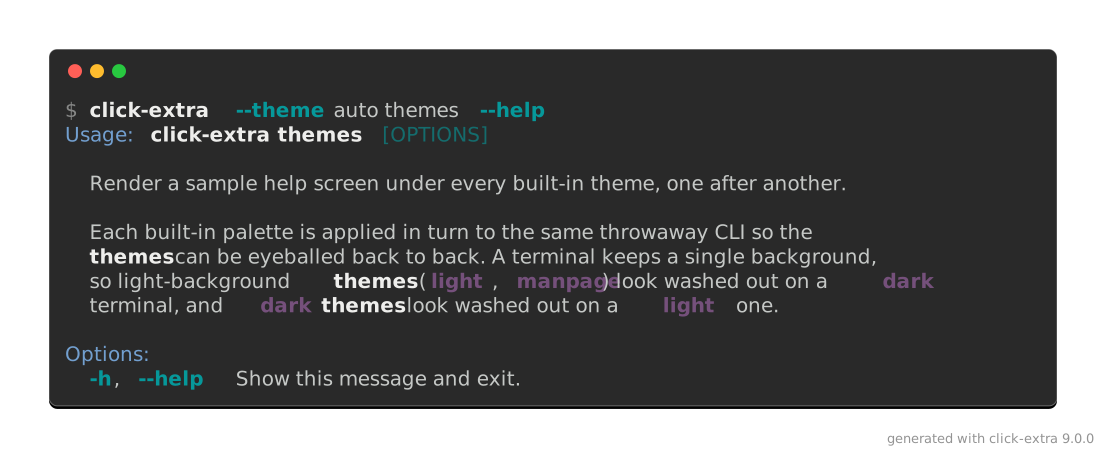
$ click-extra screenshot --output docs/assets/auto-theme-dark-screen.svg --prompt "click-extra --theme auto themes --help" -- uv run --frozen -- click-extra --theme auto themes --help
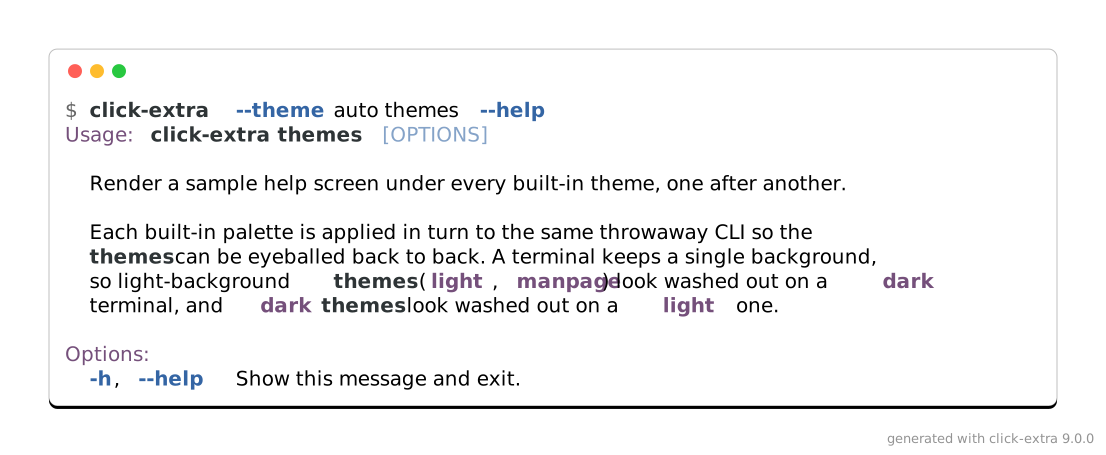
$ click-extra screenshot --output docs/assets/auto-theme-light-screen.svg --background light --prompt "click-extra --theme auto themes --help" -- uv run --frozen -- click-extra --theme auto themes --help
auto is not the default, on purpose. A CLI that never asks for it keeps rendering exactly as it does everywhere else. That is why the examples below spell out --theme dark and --theme light rather than rely on detection.
Here is one help screen taken both ways, with the CLI’s theme and the image’s chrome moving together:
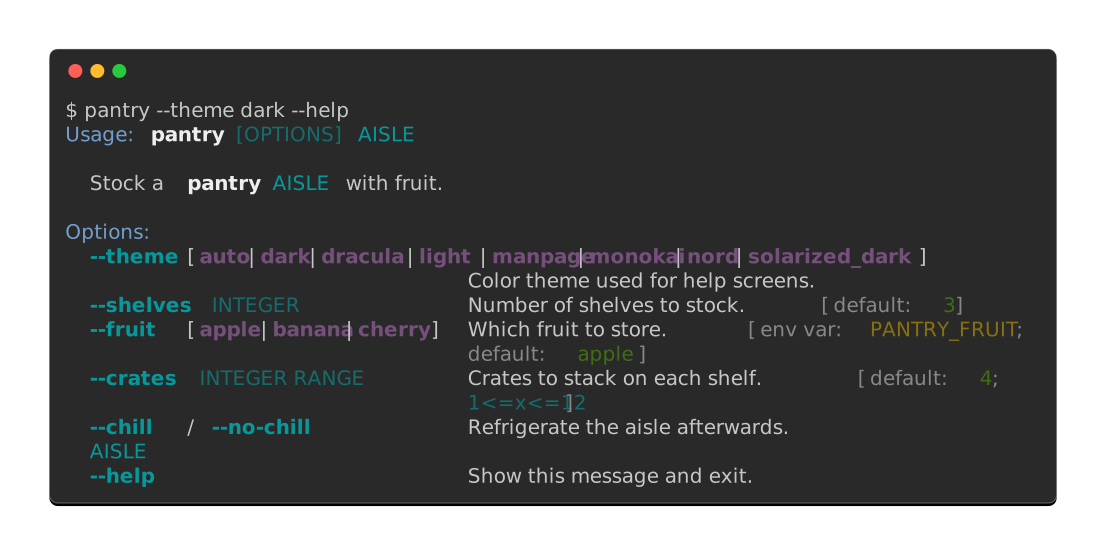
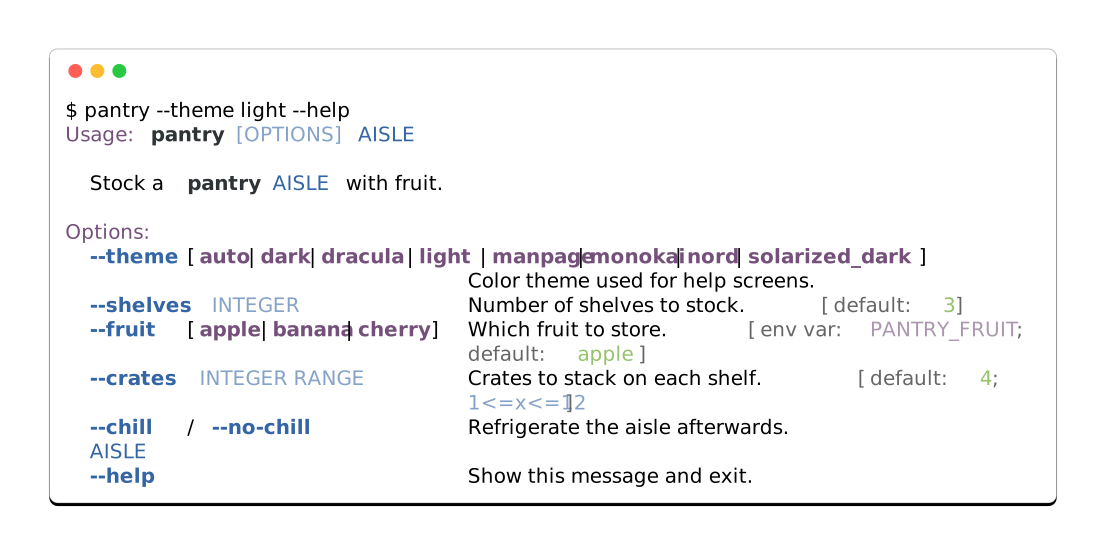
Both blocks hide their results, an exception to what :screenshot: is usually for. A results block on this page takes its colors from the site’s stylesheet and follows the reader’s own theme, so it cannot show the one thing being compared here.
The window
A capture is drawn as a terminal window: a rounded rectangle, framed with a border and lifted off the page by a drop shadow. Every part of it is an option:
$ click-extra screenshot --output shot.svg --title "my-cli --help" --backdrop "#1f6feb" --radius 0 --border-width 2 --margin 28 -- my-cli --help
Option |
Takes |
Default |
Draws |
|---|---|---|---|
|
CSS color |
the chrome’s |
The frame around the window. |
|
pixels |
|
How thick that frame is. |
|
pixels |
|
How round the window’s corners are. |
|
CSS color |
the chrome’s |
The drop shadow under the window. |
|
CSS color |
none |
A page behind the window, margin included. |
|
pixels |
|
Transparent space around the window. |
|
|
|
How solid the window’s body is. Under |
|
text |
the click-extra credit |
A credit line in the image’s bottom-right corner. Empty draws none. |
|
CSS color |
a neutral gray |
The ink that line is drawn in. |
|
pixels |
|
Space inside it, on top of the renderer’s own. |
|
flag |
off |
A dim gutter numbering the captured lines. |
|
text |
none |
A caption centered in the window’s title bar. |
Two of them default to the chrome’s own value rather than a fixed one. That is why they are not constants: a fixed translucent white would make a light capture a white window on a white page, with no visible edge.
The rest depend on what the capture is for. A shadow needs --margin to fall into, because the image’s own box cuts whatever lands past it. --backdrop fills that same space instead of leaving it transparent, which turns a capture into a self-contained picture for a slide or a social card. --radius 0 drops the desktop-window look, for a capture meant to read as a plain block of output.
Both formats take the same options. An HTML capture lands them on the block’s border, border-radius, box-shadow, margin, padding and the page’s background.
Tip
A shadow is an SVG filter. Some renderers skip filters, but they still draw the border, so the window keeps an edge either way.
Gradients
--backdrop also takes a CSS gradient, which gives a capture its own page:
$ click-extra screenshot --output card.svg --backdrop "linear-gradient(135deg, #667eea, #764ba2)" -- my-cli --help
Understood are linear-gradient, opening with an angle (135deg) or a side keyword (to bottom right), and radial-gradient. Both take two or more color stops, each pinnable at a percentage (#667eea 30%). Anything else is treated as a plain color. HTML captures pass the value through to CSS untouched.
Transparency
--opacity makes the window’s body translucent, the way a terminal set to transparency does. Below 1, whatever sits behind the capture shows through, while its text, frame and title bar keep their own paint:
$ click-extra screenshot --output glass.svg --opacity 0.7 --backdrop "linear-gradient(135deg, #667eea, #764ba2)" -- my-cli --help
Over a backdrop it reads as frosted glass: the gradient tints the terminal instead of stopping at its edge. With no backdrop, the page shows through, which is what a capture dropped on a surface you do not control wants. What limits the value is legibility: a body much under half solid gives the text whatever contrast the backdrop happens to have.
An HTML capture thins the block’s background color with CSS color-mix(), so the page it is pasted into shows through the same way.
Line numbers
--line-numbers draws each line’s number in a dim gutter, the way Pygments does inline. Line 1 is the prompt:
$ click-extra screenshot --output numbered.svg --line-numbers -- my-cli --help
The numbers land in the terminal text rather than in a column of their own, the same trade Pygments makes: every renderer places them for free, and a reader copying an HTML capture copies them too.
It also means the gutter spends columns the command already used: a screen wrapped at 80 comes back a few characters too wide and folds. Pair the flag with --columns auto, or with a width that leaves room for the gutter, so the image grows instead of the lines breaking.
Emphasized lines
--emphasize-lines draws a band behind the lines it names, the way Pygments marks a highlighted line in a code block. Line 1 is the prompt, the same line the gutter counts first:
$ click-extra screenshot --output marked.svg --emphasize-lines 2,4-5 -- my-cli --help
The band is mixed from the chrome it is drawn on rather than stated outright, so one setting serves both: a shade lighter than a dark terminal, a shade darker than a light one. It runs from one edge of the window to the other, because what is emphasized is the row, not the column of text in it. It sits behind the text and follows the window’s own rounding, so a band on the last line cannot square off the corners.
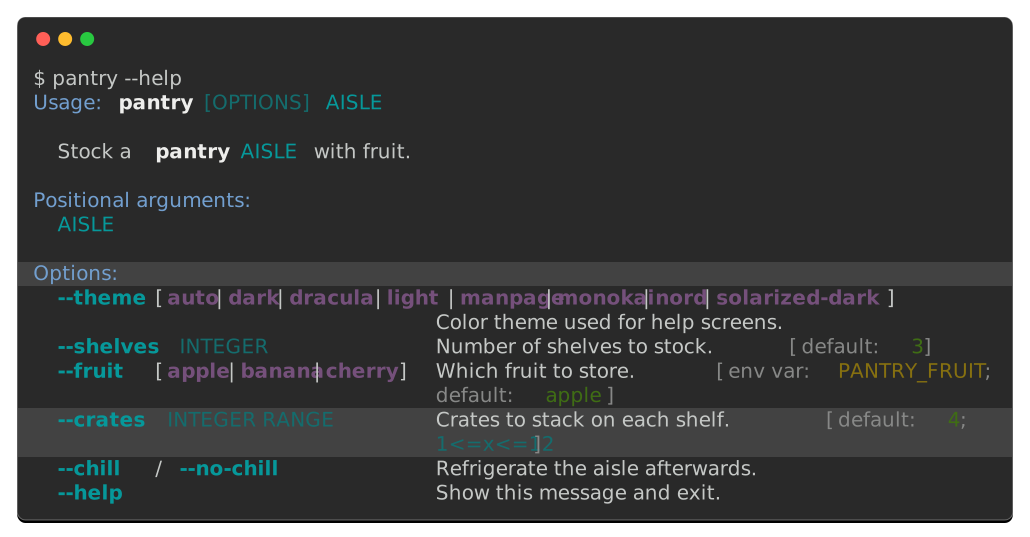
Lines are counted on the canvas, blanks included, the way a gutter numbers them. Turn :screenshot-line-numbers: on while choosing them and the two counts agree.
Ranges on the command line are closed, so state both ends: the capture’s height is only known once the command has run, too late for 4- to mean anything. Inside a documentation block the height is known, so :screenshot-emphasize-lines: takes the open-ended form too.
An animated capture bands the same way, one frame at a time. A band appears with the frame that first draws the row it marks, and it is gone wherever the row is. The empty beat closing a cycle carries none: banding a row before the animation reaches it would read as a stray rectangle in blank space.
The credit line
Every capture the command writes carries a credit line in the margin at its bottom-right corner. Here is one, reading generated with pantry 1.4.2:
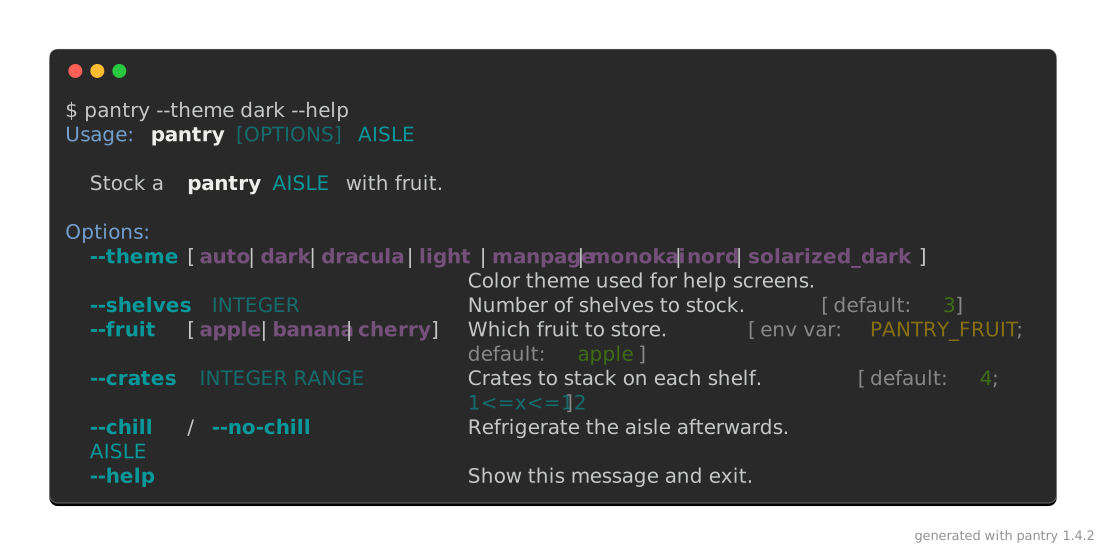
By default, the line names click-extra and the release that drew the image. A capture needs that once it has travelled: on a slide, in a README or on a social card it sits far from the page that explains where it came from. --watermark replaces the text, and an empty string draws none:
$ click-extra screenshot --output shot.svg --watermark "pantry 1.4.2 · example.com" -- my-cli --help
$ click-extra screenshot --output shot.svg --watermark "" -- my-cli --help
Crediting your own project rather than the tool that drew it is the expected case, not an exception. Set it once in your configuration file and every capture carries it.
The mark is the one thing drawn outside the window, so it is also the one paint that cannot follow the chrome: the margin is transparent, and behind it sits a page this command never sees. Hence a neutral gray, which reads on a white README and a dark one alike. --watermark-color covers a capture whose backdrop it has to sit on.
A capture written by a click:run block carries no watermark by default. That image is regenerated on every documentation build, so a release number in it would rewrite every asset on release day, and the page around it already says what drew it. :screenshot-watermark:, or the click_extra_screenshot_watermark conf.py value, turns it on for a project that wants it anyway.
All of it at once
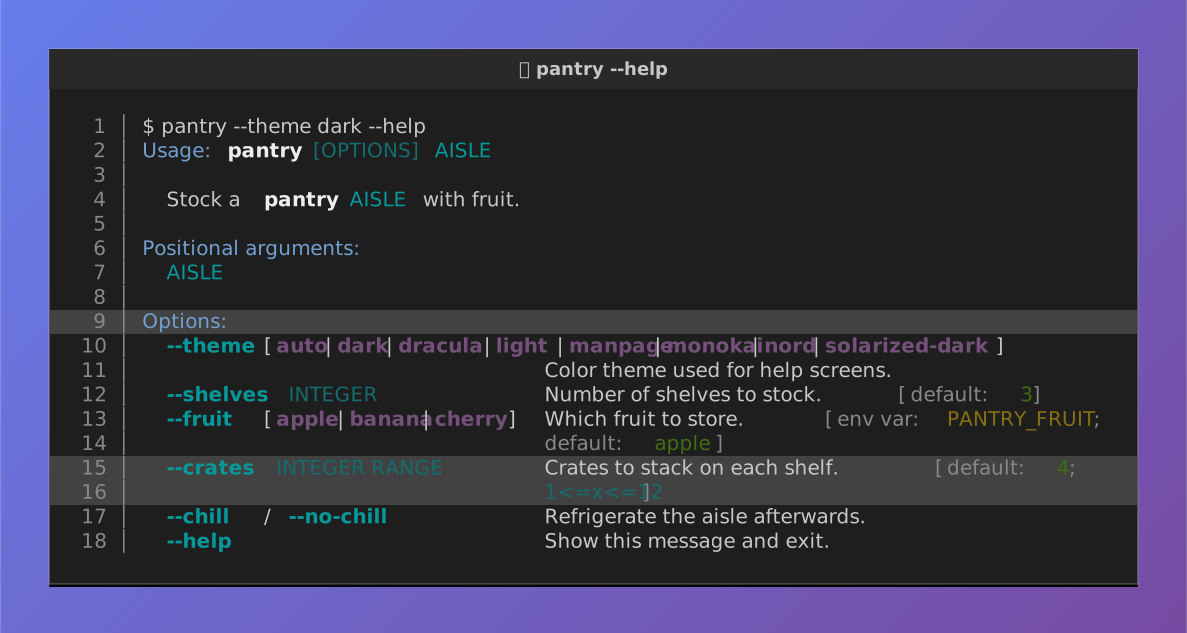
Here is the pantry screen again, wearing every option above: on a gradient, captioned, numbered, rounded, padded, see-through enough for the gradient to tint it, and with its Options: heading and its --crates entry picked out. The second tab shows the block that wrote it:
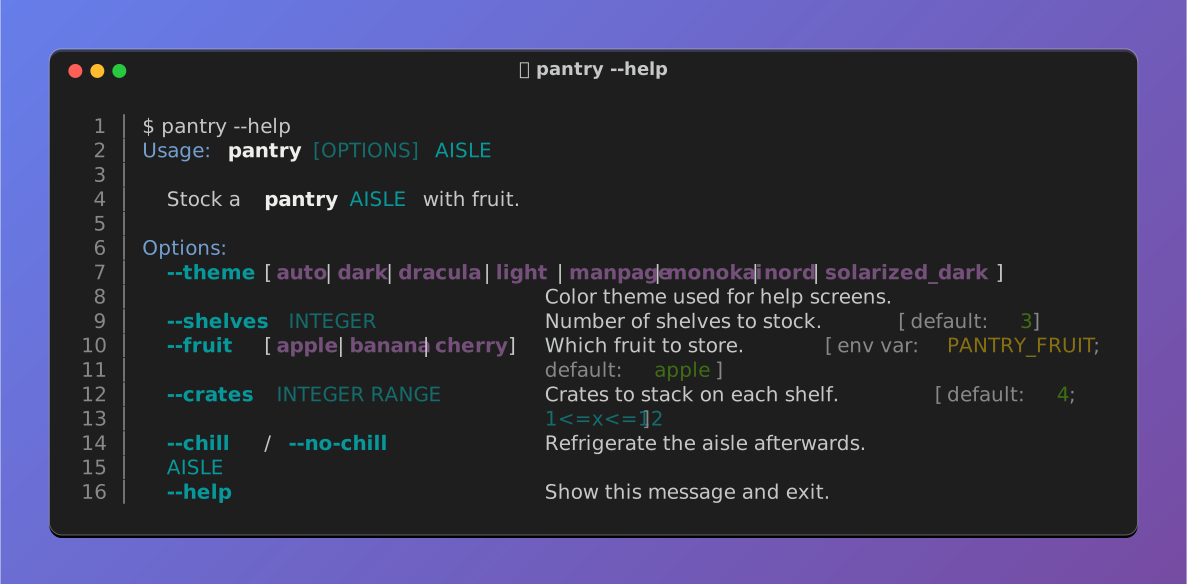
```{click:run}
:screenshot: styled-window-screen
:screenshot-columns: auto
:screenshot-title: 🍎 pantry --help
:screenshot-backdrop: 'linear-gradient(135deg, #667eea, #764ba2)'
:screenshot-emphasize-lines: 6,12-13
:screenshot-line-numbers:
:screenshot-opacity: 0.75
:screenshot-radius: 12
:screenshot-padding: 24
:hide-results:
result = invoke(pantry, args=["--help"])
assert result.exit_code == 0
assert "--crates" in result.stdout
```
A caption takes any text a terminal can draw, emoji included. :hide-results: is this page’s choice, since the window is the thing on show: leave it out and the block renders its live text below the fence as well.
None of that is limited to the still. An animated capture is drawn through the same window, so it carries the gradient, the caption, the rounding, the transparency and the gutter exactly as a screenshot does. Here is a pantry being restocked, wearing everything above:
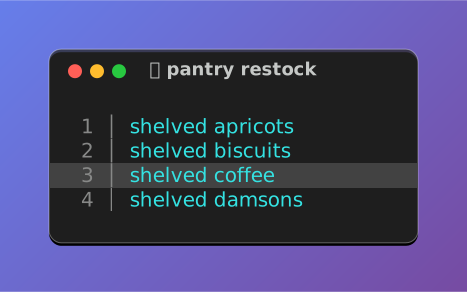
The gutter counts each frame’s own rows, so it grows as the trail does, and the band on the third line arrives on the same frame its number does.
Terminal presets
A capture is a picture of a terminal, and terminals do not look alike. --preset styles the window as a named desktop’s terminal:
$ click-extra screenshot --output shot.svg --preset windows -- my-cli --help
Each preset carries the four things that make a terminal recognizable: its window decorations, the palette its colors resolve against, the font it ships with, and the prompt sigil of its usual shell. An option stated alongside wins, so --preset windows --radius 8 rounds the corners Windows squares.
A preset also paints the strip its buttons and caption sit in, a shade off the terminal’s own background, because that strip belongs to the desktop. That makes plain the odd one out: it mimics no desktop, wears no buttons, and drops the strip entirely unless a --title gives it something to hold.
Each tab below shows its preset twice: bare, and then wearing everything else this page offers. The second picture states no --radius, so each terminal keeps its own corners: Windows stays square under the same gradient that rounds the other three.
Transparency lands least alike across them, because each preset brings its own background for the gradient to show through. At 75% it barely lifts Apple Terminal’s black and visibly lifts GNOME’s lighter #2e3436. All four still clear WCAG AA for their text, from 14.4:1 down to 6.4:1, so what changes is the character of the window, not whether it can be read.
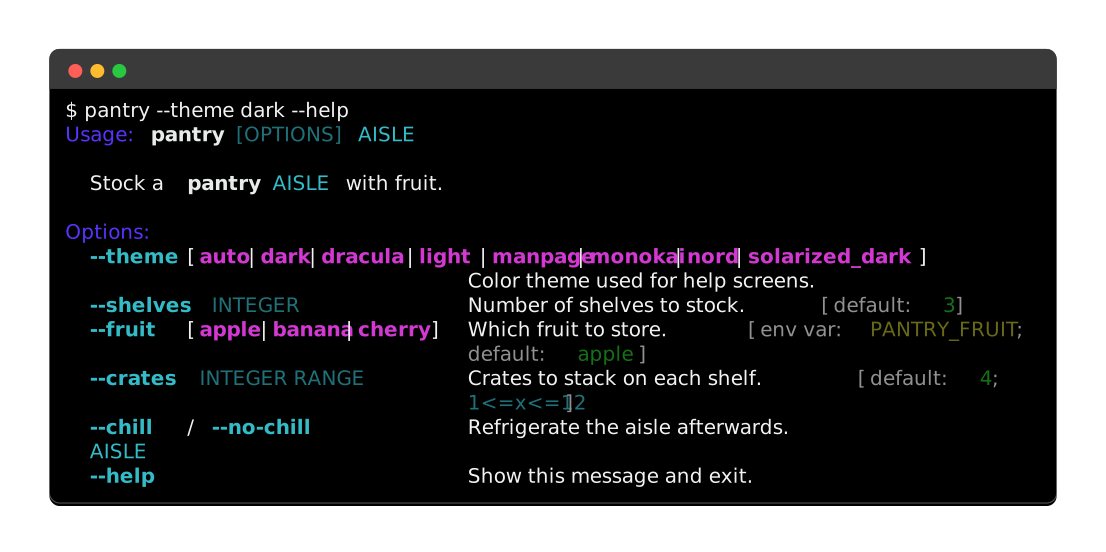
Round buttons on the left, Apple’s Pro and Basic palettes, SF Mono, and a $ prompt.
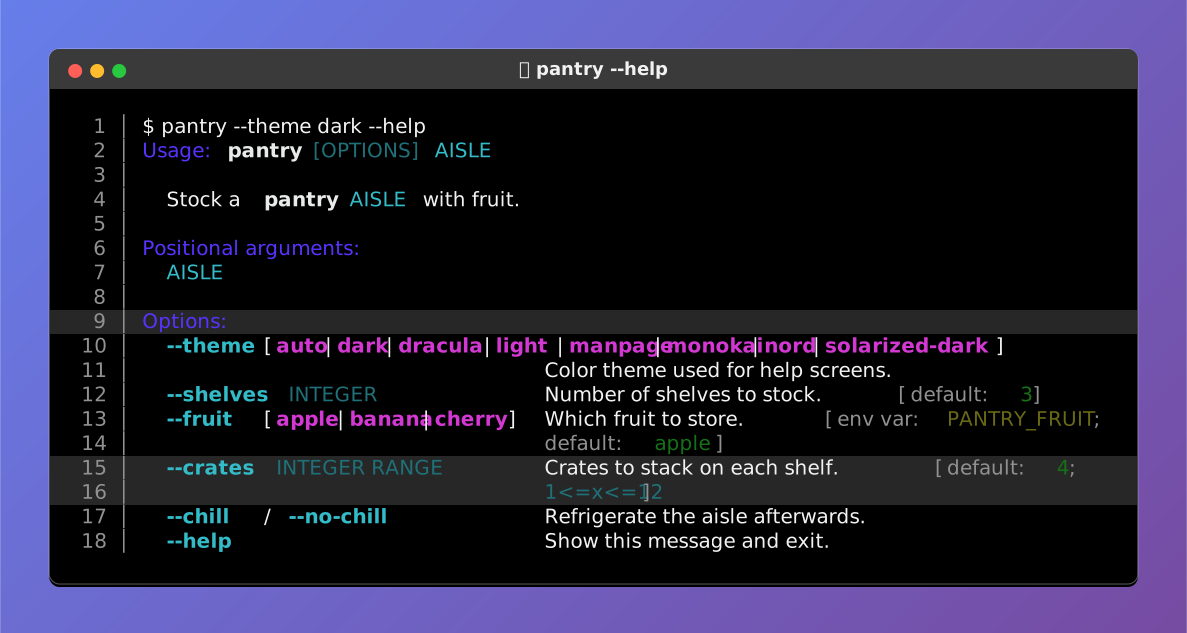
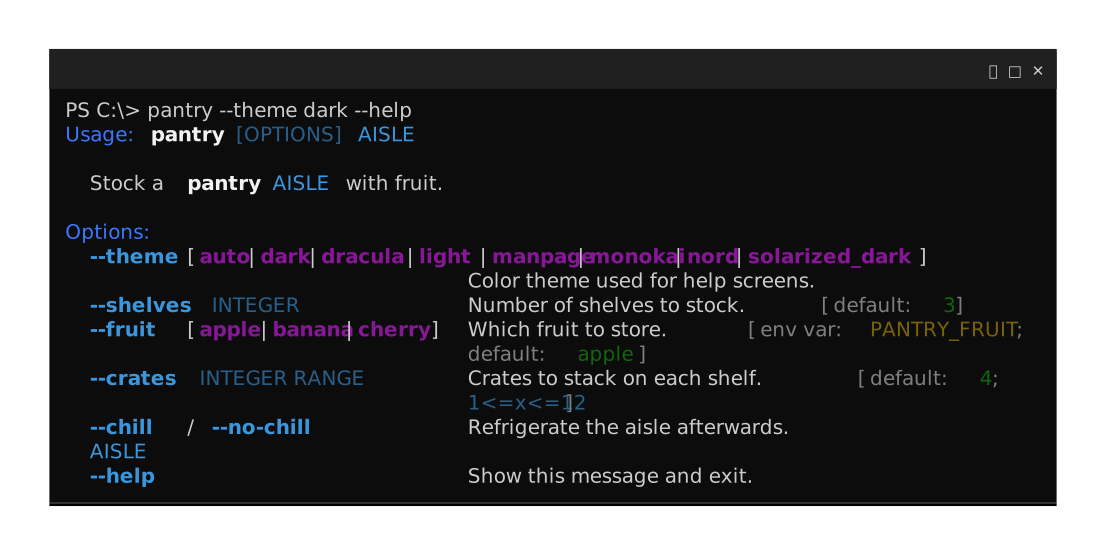
Minimize, maximize and close on the right, square corners, the Campbell and One Half Light schemes, Cascadia Code, and a PS C:\> prompt.
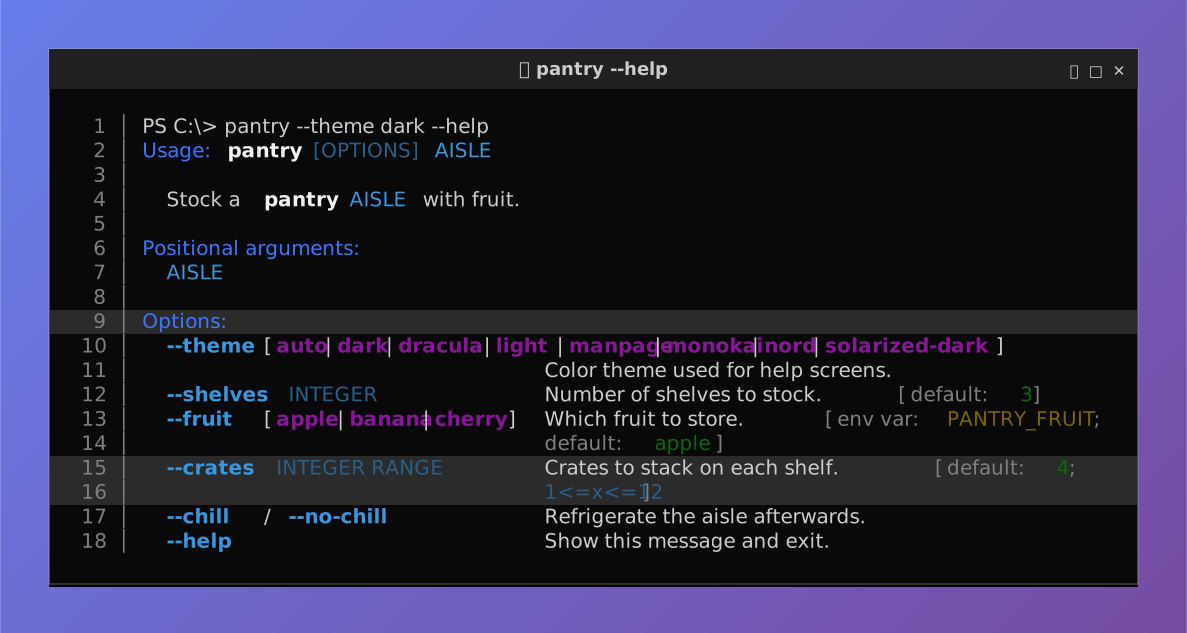
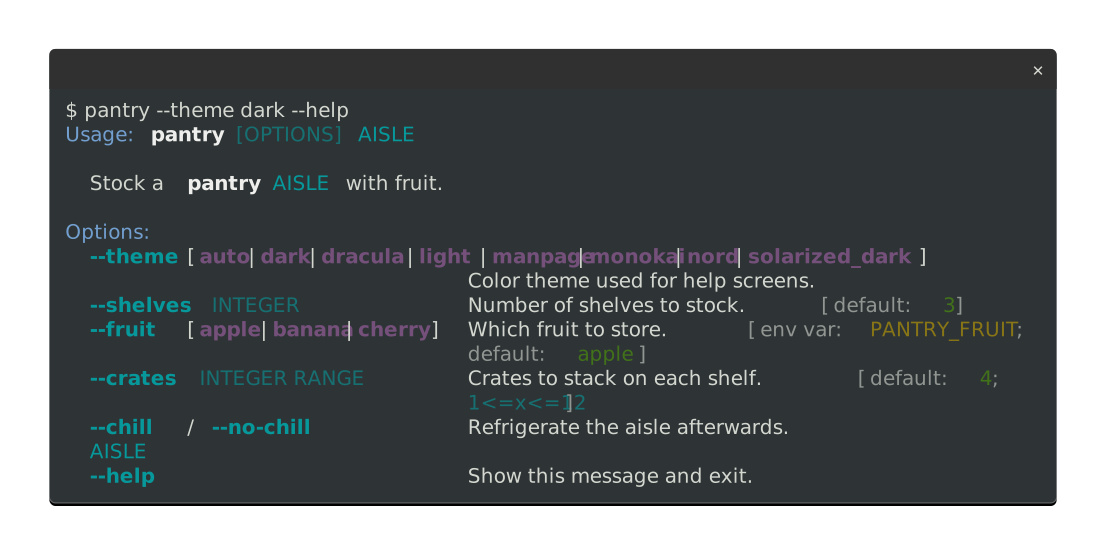
A single close button, the Tango palette GNOME Terminal ships, Ubuntu Mono, and a $ prompt.
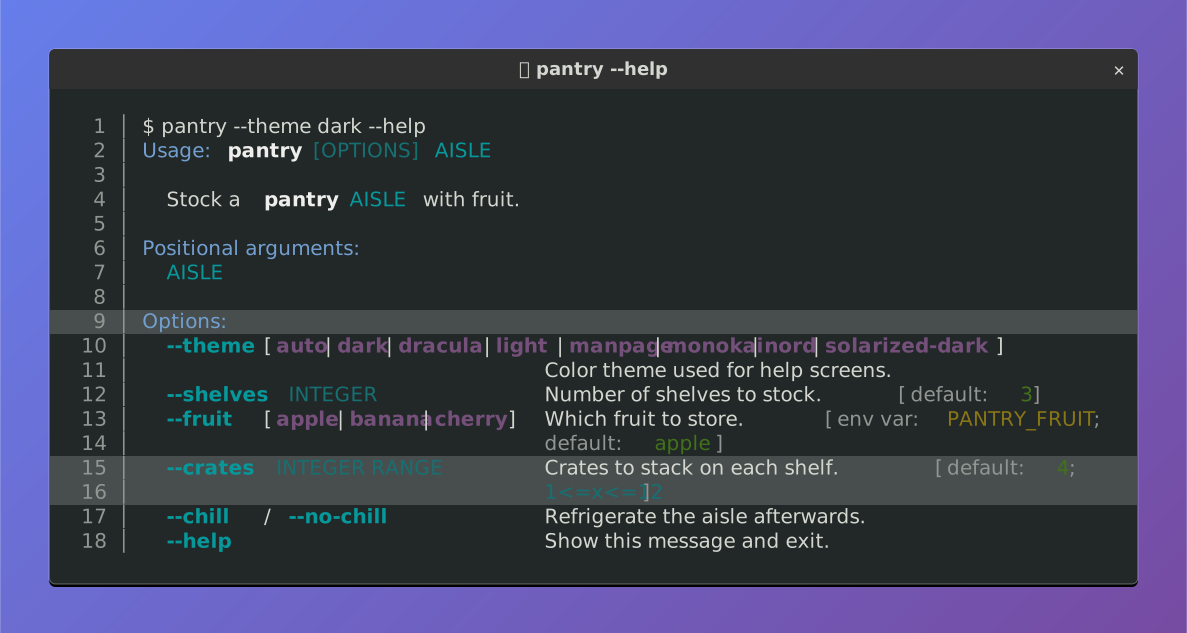
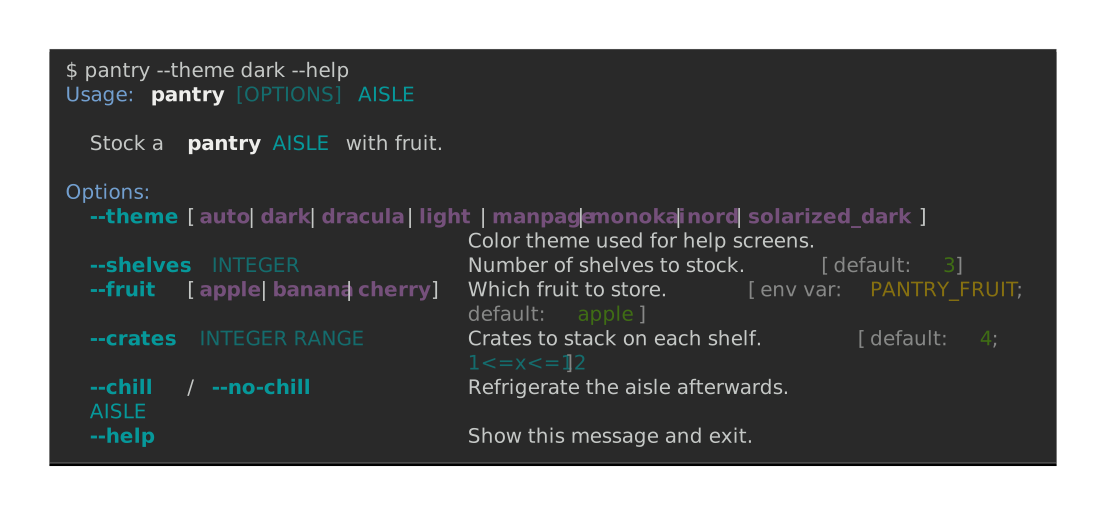
No buttons, no rounded corners, no title bar: for a capture that has to read as a block of output rather than as a window, on a slide or in a paper.
Caution
A preset’s palette is the scheme its terminal ships with, not the one your reader configured. It also decides how the captured CLI’s colors land: a screen rendered for a dark theme on a light preset washes out, exactly as the chrome section describes.
Wide glyphs and writing systems
A terminal cell is not a character. A Chinese ideograph, a Hangul syllable, a fullwidth Latin letter and most emoji are each drawn two cells wide, while a combining accent is drawn in none at all. A capture measures its runs in cells, through click_extra.layout.cell_width(), which is the same wcwidth measurement click-extra already uses to align tables and the command tree.
The CLI below pads with that measurement, so every name lands on column 12 whatever script precedes it:
from click_extra import command, echo
from click_extra.layout import cell_width

FRUITS = (
    ("苹果", "apple"),
    ("バナナ", "banana"),
    ("체리", "cherry"),
    ("KIWI", "kiwi"),
    ("🍎🍌🍒", "basket"),
    ("┌──┬──┐", "crate"),
    ("مشمش", "apricot"),
)

@command
def market():
    """List each fruit beside its name, aligned on a fixed column."""
    for glyphs, name in FRUITS:
        echo(f"{glyphs}{' ' * (12 - cell_width(glyphs))}{name}")
$ market
苹果        apple
バナナ      banana
체리        cherry
KIWI    kiwi
🍎🍌🍒      basket
┌──┬──┐     crate
مشمش        apricot
Size a run by its character count instead and the picture drifts: the seven lines above would land on four different columns, the wide scripts drawn at half their width and stacking on each other. That is rich#2742, open upstream since 2023 and one of the reasons this renderer is click-extra’s own. The upstream page collects the rest.
Two spaces are what mark a column. A capture cuts each line at its gutters (click_extra.screenshot_svg.column_segments()), then pins every piece to its own offset. One space is ordinary word spacing rather than a gutter, so a wide glyph and the word after it stay a single run, and where that word sits inside the run is left to the font. Pad a column to a fixed width, the way market does above, instead of separating it by one space. Captured output rarely trips on this: a table or a help screen already leaves two spaces or a rule between its columns. A hand-written example is where it shows.
Note
Right-to-left scripts are the case cell arithmetic cannot settle. Arabic and Hebrew are reordered by whoever draws them, and the cursive ones are shaped: a letter’s form depends on the letters it joins. A run carrying any of them is therefore left to size itself, rather than pinned to an exact width that would pay for the difference in letter spacing and pull the word apart at its joins. The run still starts on its own column, so the grid around it holds; only its own width floats.
Box-drawing and block characters are not letters but tiles: a table’s rule, a tree’s elbow and a gradient’s bar are drawn by butting them edge to edge. They are emitted in short groups, each landing on a stated offset, so a font drawing them a fraction of a pixel off the grid cannot accumulate that error across a rule and leave the table’s corners missing their own border. What remains is whether two adjacent tiles join cleanly, which is the font’s business and no renderer’s: that one is rich#2536, where the answer upstream is that it would take replacing the characters with drawn shapes. click-extra does not do that either.
Animate a capture
Animated captures
An SVG capture can hold more than one frame. Pass frames a sequence of captured texts and interval how long each is shown. The window and its caption are drawn once, and every frame is stacked inside them.
from pathlib import Path

from click_extra.screenshot_svg import render_svg
from click_extra.spinner_presets import SPINNERS
from click_extra.styling import Style

preset = SPINNERS["moon"]
lemon = Style(fg="#f1fa8c")
Path("brewing.svg").write_text(
    render_svg(
        columns=34,
        title="brewing",
        unique_id="brewing",
        frames=[lemon(f"{frame}  brewing tea…") for frame in preset.frames],
        interval=preset.interval,
    ),
    encoding="utf-8",
)
One number for interval times every frame alike, which is what a spinner asks for. A sequence gives each frame its own, which is what a recording asks for.
The frames differ in nothing but their text, so one stylesheet covers all of them. Everything is namespaced by unique_id, keyframes included, so two animations inlined into one page keep their own timing.
A row drawn the same in every frame is drawn once. Only the rows that move are copied per frame, which keeps a recording with little motion small.
One frame stays visible wherever the animation does not run, so a capture is never a blank rectangle. The capture also honors a system asking for reduced motion, by keeping every animation rule behind a prefers-reduced-motion guard.
A recorded animation also pauses on its last frame and then closes on an empty beat, 2.6 seconds by default. A loop restarting the instant it arrives gives a reader no time to read the end. The empty beat says plainly where the loop comes round.
Three knobs state all of it, on render_svg, on the --record command line and on a documentation block alike:
|
CLI |
Directive |
What it sets |
|---|---|---|---|
|
|
|
Extra seconds on the last frame, or |
|
|
|
Seconds of empty screen closing the cycle. |
|
|
|
How much faster to play than recorded: |
speed scales the replay only. The two pauses are stated in real seconds and stay untouched. A declared spinner cycles in place and ends nowhere, so it holds and blanks for nothing unless a page asks.
hold also takes auto, which scales the pause to the final frame itself: a quarter second per populated line, clamped between 2 and 30 seconds. A fixed number serves an ending the author has seen; auto serves one that changes with every retake, like a recorded command whose closing report grows with what there is to report. A :screenshot-record: block and a --record capture therefore default to it, and a stated number overrides it.
The frame left visible is the last one, because an animation that accumulates says most once it has finished. An animated capture is therefore always a still as well.
A blinking cursor
A capture draws no cursor unless it is asked for one. Pass a Cursor and it draws one:
from click_extra.screenshot_svg import render_svg
from click_extra.screenshot_presets import Cursor, CursorShape

render_svg("$ pantry restock --crates 4", columns=44, cursor=Cursor())
Where the cursor stands is never stated: it is read off each frame’s own text. A screen ends with whatever was written to it last, so the cursor sits after that. Output closing on a newline puts it on the row underneath, and the window grows a line to hold it, the way a terminal’s does.
Three fields say what it looks like:
Field |
What it sets |
|---|---|
|
|
|
Seconds one blink takes. |
|
Paint it is drawn with. |
A preset names the shape its terminal draws, so --preset windows gets Windows Terminal’s bar and the rest get a block. Cursor(CursorShape.BAR) overrides that.
The blink runs on a clock of its own rather than on the animation’s. The two drift against each other across a loop, which is what a terminal showing a cursor over a running command looks like.
Caution
Blinking is motion. The rule sits behind the same prefers-reduced-motion guard as every other animation here, so a reader who asked their system for less of it gets a cursor that is lit and still.
A still capture takes a cursor too, and leaves it after the last thing the command printed, which is where the shell finds it. :screenshot-cursor: asks a documentation block for one, and :screenshot-blink: says how fast. A block draws its own invocation already:
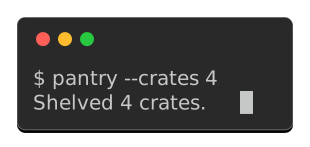
The cursor sits on the row under the output, because the command’s last line ended on a newline. That is where a terminal leaves it, so the window grows a line to hold it.
The shell coming back
A command exits and the shell prints its prompt again. --closing-prompt, and :screenshot-closing-prompt: on a documentation block, draw that last row:
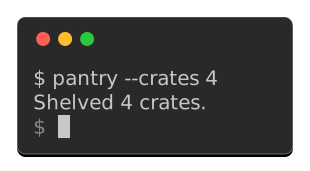
Alongside a cursor it is free. Output ending on a newline already leaves the row the cursor waits on, and the sigil fills it instead of leaving it blank. A command that never ended its line is given one, exactly as a shell prints its own newline before prompting.
An animation closes its last frame and no other. The shell has not come back while the command is still drawing, and a sigil on an earlier frame would say it had.
Recording an animation
The frames above were declared. They can also be recorded, from a command that draws them.
This is the one thing a pipe cannot capture. A spinner asks whether its stream is a terminal and stays silent when it is not, so a command run the ordinary way prints its result and none of the frames leading to it. Forcing color through the environment does not help, because that answers a different question.
For a spinner this process hosts, hand it a ScreenRecorder. It claims to be a terminal without being one, so no pseudo-terminal is involved and it works on every platform:
from click_extra import SPINNERS, Spinner
from click_extra.recording import ScreenRecorder

recorder = ScreenRecorder()
with Spinner("Brewing tea", spinner=SPINNERS["moon"], stream=recorder):
    steep()
frames = recorder.frames()
For a command this process does not host, record_command runs it under a pseudo-terminal and reads both its output and its errors, the spinner drawing on the latter:
from click_extra.recording import record_command

frames = record_command(("kettle", "boil", "--slowly"), columns=60, duration=5.0)
That path is Unix only: a pseudo-terminal is termios and pty, neither of which Windows ships, and reaching ConPTY would mean a dependency. The in-process recorder above covers Windows.
Each Frame carries the screen it held and how long it held it, so render_svg takes them directly:
render_svg(
    columns=60,
    frames=[frame.text for frame in frames],
    interval=[frame.duration for frame in frames],
)
Caution
A recording is timed by the wall clock, so the same command records slightly different durations every run. That is fine for a one-off image, and a problem for a committed one that is rewritten on every build: see keeping a recording committable.
Type the command first
A recording holds what a command drew and never the invocation that drew it, so an animation opens on output arriving from nowhere. typing types the command line out first, one character per frame:
from click_extra.recording import record_and_render
from click_extra.screenshot_presets import Cursor

svg, returncode = record_and_render(
    ("pantry", "restock", "--crates", "4"),
    columns=44,
    typing=0.05,
    submit=0.45,
    cursor=Cursor(),
)
typing is how long a character takes to appear, and submit is the beat the finished line waits before the output starts, which is the pause before the return key. Leave typing out and the prompt stands there from the first frame, which is what a recording shows without it.
The typed screens are ordinary frames. Everything the picture does for a frame therefore reaches them: a gutter numbers them, and the cursor walks along the line with no caret of its own to state.
For an animation assembled by hand, type_line makes those frames from a prompt line and nothing else:
from click_extra.recording import type_line

opening = type_line("$ pantry restock --crates 4", typing=0.05)
A documentation block asks for the same with three options. :screenshot-prompt: states the invocation to draw, :screenshot-typing: types it, and :screenshot-submit: sets the beat before the output starts:
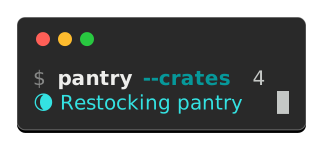
The cursor walks the line as it is typed, then drops to the spinner it started. Nothing states that: the cursor is read off each frame’s text, so it follows whatever the frame last drew.
Tip
A typed opening costs one frame per character. Those frames differ by a single character each, so they compress to almost nothing over the wire: the raw file roughly doubles while the gzipped one grows about a kilobyte.
Keeping a recording committable
A committed capture is rewritten on every build, which keeps it from drifting away from the CLI. A recording cannot live that way, and not because of its timings: the scheduler decides which spinner glyph pairs with which screen, so the same command records a different set of frames on every other run. Rounding the durations with quantize settles the jitter but cannot touch that.
So a recording is written once and then kept. :screenshot-record: writes the asset the first time and leaves it alone afterwards. It does not even evaluate its expression once the file exists. To take a fresh recording, delete the file and build again.
A recording states what it pictures on a line beside the generator tag:
<!-- @generated by Click Extra 9.4.1 -->
<!-- @recording frames=43 period=6.3s digest=90877cf3f14015d6 -->
The digest covers the frames a cycle holds and the beat it holds them on, not their order or their count.
Caution
Written once means frozen: nothing re-checks a recording against the code it pictures, so it rots the way any hand-made screenshot does. A declared animation has no such problem, being composed rather than timed, and is regenerated on every build like every other capture.
Recording from the command line
--record turns the screenshot command into a recorder: the command runs under a pseudo-terminal, so a spinner or a progress bar draws the frames it would draw for you, and every screen it leaves behind lands in one animated SVG.
$ click-extra screenshot --record --output recorded-trail-screen.svg -- click-extra trail
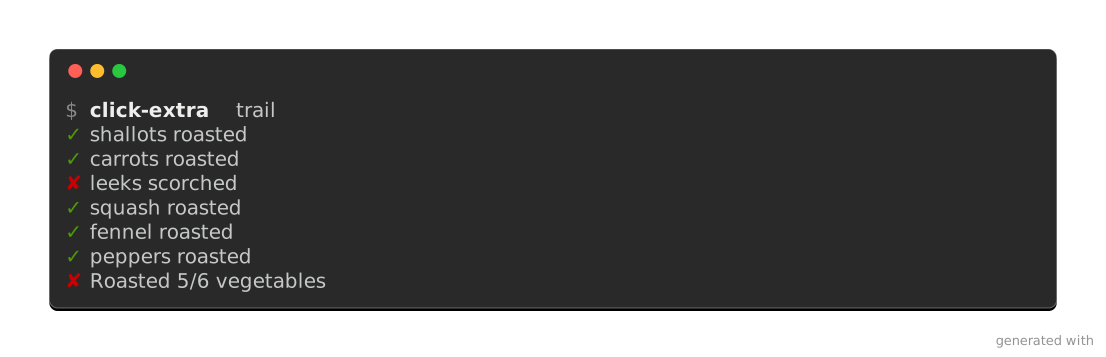
--cursor and --typing turn a recording into a session: the command line types itself at the prompt, a cursor follows it along, and the output arrives underneath.
$ click-extra screenshot --record --cursor --closing-prompt --typing 0.05 --columns 46 --output typed-trail-screen.svg -- click-extra trail
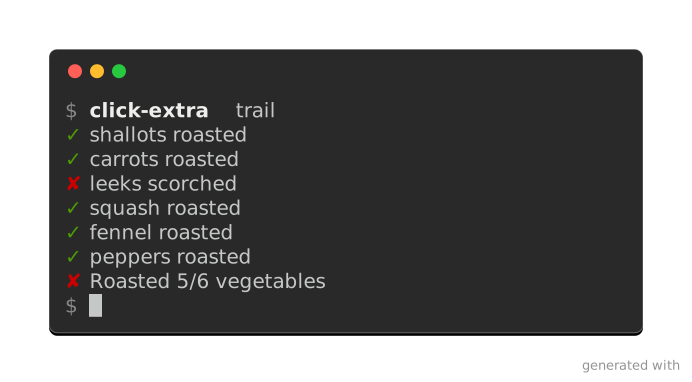
--cursor on its own takes the shape the --preset terminal draws, and --cursor bar or --cursor underline overrides it. --blink 0 leaves the cursor lit and still. Both apply to a still capture as well, where the cursor lands after the last thing the command printed.
The invocation is drawn above every frame, exactly as a still capture draws its own prompt, and --prompt overrides or hides it the same way. --rows states the terminal’s height, --timeout stops a recording that would run on, and the pacing knobs above apply as given. Two of a still capture’s arrangements do not carry over: the width must be a number, since the pseudo-terminal exists before the command draws its first line, and --head/--tail stay out, a recording being made of whole screens.
Caution
Unix only, for the reasons record_command() states. The same pipeline is scriptable through record_and_render().
Publish and maintain
Stating a default once
screenshot is itself a Click Extra CLI, so every option above is also a configuration key. To draw every capture the same way, state it once in the pyproject.toml click-extra finds by walking up from the working directory:
[tool.click-extra.screenshot]
preset = "macos"
margin = 64
opacity = 0.85
watermark = "pantry 1.4.2 · example.com"
Any dedicated configuration file does the same under a [click-extra.screenshot] table. A flag on the command line still wins over both, following the usual precedence, so a single capture can break the house style without editing anything.
In Sphinx documentation, click:run blocks write the captures rather than the command, so the same setting is a conf.py value:
click_extra_screenshot_preset = "macos"
It covers every block whose :screenshot: names no preset of its own, leaving :screenshot-preset: for the pages that depart from it. A project keeping its settings in one place can read the value back out of its pyproject.toml, conf.py being Python:
import tomllib
from pathlib import Path

pyproject = tomllib.loads(Path("../pyproject.toml").read_text(encoding="utf-8"))
click_extra_screenshot_preset = pyproject["tool"]["click-extra"]["screenshot"]["preset"]
Keeping captures fresh
Here is the command pointed at click-extra itself. Its bundled CLI doubles as a live demo of the rendering features. Each image below was produced by the line printed under it, run from a checkout.
gradient puts 24-bit ramps next to their 256-color quantized equivalents, so the stepping the smaller palette introduces is there to see:
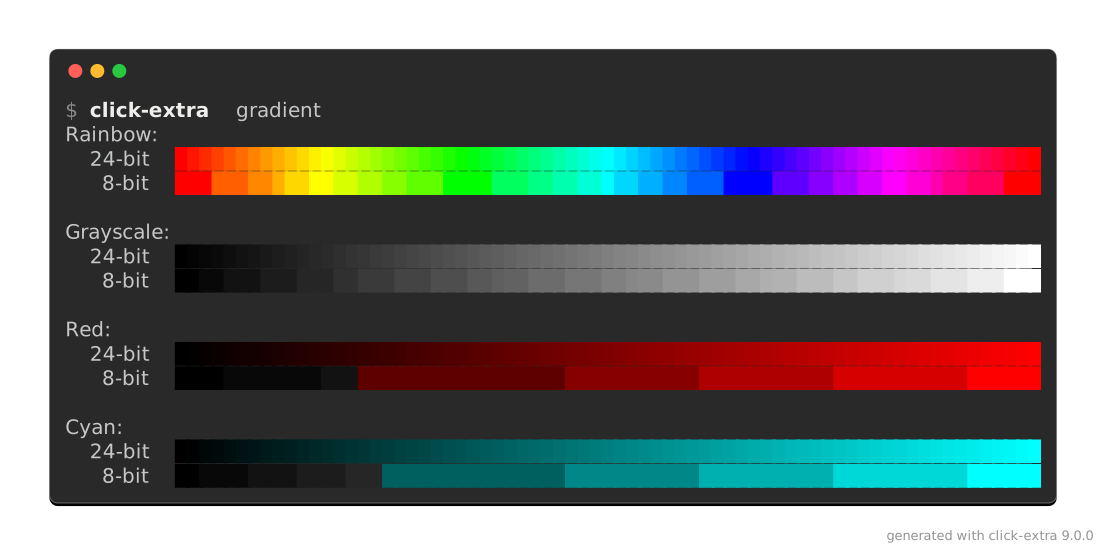
$ click-extra screenshot --output docs/assets/color-gradient-screen.svg --prompt "click-extra gradient" -- uv run --frozen -- click-extra gradient
styles crosses every color with every text style. Its table wants far more than 80 columns, so the capture is taken at the width it actually needs:
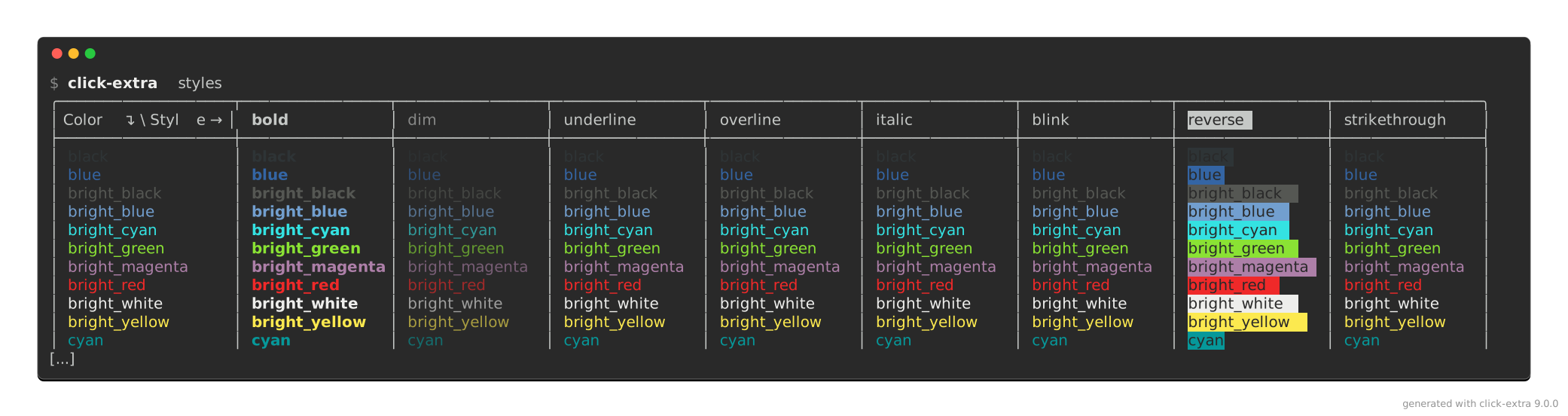
$ click-extra screenshot --output docs/assets/text-styles-screen.svg --columns 160 --head 14 --prompt "click-extra styles" -- uv run --frozen -- click-extra styles
themes renders a sample help screen under each built-in palette, and this capture keeps the first two of them, which is what --theme does to a screen:
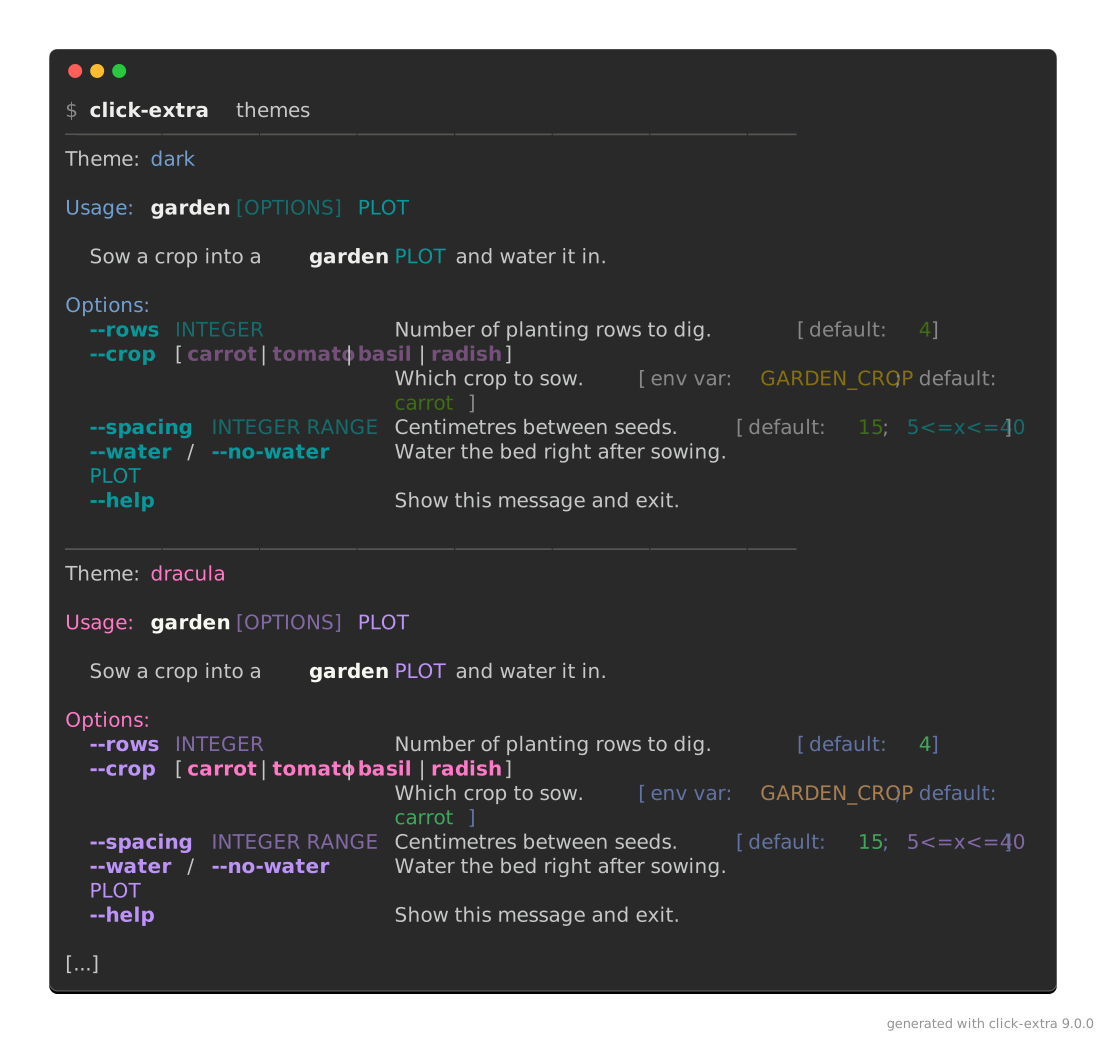
$ click-extra screenshot --output docs/assets/theme-gallery-screen.svg --head 34 --prompt "click-extra themes" -- uv run --frozen -- click-extra themes
--prompt makes each image show the bare click-extra … a reader would type, while uv run --frozen -- is what actually ran. The plumbing that reaches a checkout’s copy of the CLI is not worth picturing. --head bounds the two long ones, and a dotted rule closing on ✂ says the rest was cut.
The before/after pair opening the readme takes the other route. Those two screens already exist as live click:run blocks in the tutorial, so the blocks maintain them instead of shooting them again: a :screenshot: option writes each image on every documentation build. That keeps the readme’s front page in step with the code.
Use the command when the CLI you want to picture has no live block, and the directive when it does.
Whichever route, a full click-extra help screen carries --table-format, whose choice list is a single 463-character line. Click never wraps an option’s own term, so the renderer folds it across six rows, exactly as a terminal would.
Once committed, an image goes stale the first time the CLI’s help changes. tests/test_screenshots.py reads the SVG back, rebuilds the terminal text from the glyph coordinates, and compares it to what the command prints today. It fails on the first line that diverged, and re-running the command above refreshes the picture.
GitHub integration
A README can track the reader’s theme. Capture the same screen twice, once per chrome, with the CLI’s own theme moving along:
$ click-extra screenshot --output docs/assets/help-dark.svg -- my-cli --theme dark --help
$ click-extra screenshot --output docs/assets/help-light.svg --background light -- my-cli --theme light --help
Then hand both to a <picture> element, which GitHub renders in a README and which picks between them on prefers-color-scheme:
<picture>
 <source media="(prefers-color-scheme: dark)" srcset="https://raw.githubusercontent.com/me/my-cli/main/docs/assets/help-dark.svg"/>
 <img alt="my-cli help screen" src="https://raw.githubusercontent.com/me/my-cli/main/docs/assets/help-light.svg"/>
</picture>
The <img> is not a spare: every surface without the switch shows it, PyPI and most editors’ previews included. So it holds the capture that reads on the light background those surfaces default to. The <source> is the one a reader in dark mode gets instead.
Both URLs are absolute on purpose. A README is read on PyPI and in many forks of the page, and none of them resolve a repository-relative path. That is why every capture in this project’s own README is addressed through raw.githubusercontent.com.
Note
The switch keys on the browser’s color scheme, not on the theme toggle of a documentation site, so it belongs to a README rather than to these pages: Furo’s own switch would leave it unmoved.
click_extra.screenshot API
Width a capture is taken and rendered at, see AUTO_COLUMNS.
- click_extra.screenshot.TColumns: TypeAlias = int | typing.Literal['auto']
Width a capture is taken and rendered at, see
AUTO_COLUMNS.
- class click_extra.screenshot.ChromeArguments[source]
Bases:
TypedDictThe window arguments taken one by one before
Chrome.- border_width: int
- backdrop: str
- margin: int
- padding: int
- opacity: float
- watermark: str
- class click_extra.screenshot.CaptureFormat(*values)[source]
Bases:
EnumDocument formats a capture can be rendered to.
The value doubles as the file extension
format_from_path()matches on.- ANSI = 'ansi'
The escape sequences themselves, for a terminal to paint.
The one target that needs no rendering, a terminal reading the same stream the capture is carried in. So it is the whole picture minus the window: there is no frame, no chrome and no margin to draw, and every option describing one is ignored, see
render().
- HTML = 'html'
Selectable, searchable text in a self-contained
<pre>.Built on
ansi_to_html(), so it needs no extra.
- SVG = 'svg'
A picture of a terminal window, for a surface that strips inline HTML.
Laid out on a character grid by
render_svg().
- click_extra.screenshot.PROMPT_THEMES: dict[CaptureBackground, HelpTheme | None] = {CaptureBackground.DARK: None, CaptureBackground.LIGHT: HelpTheme(invoked_command=Style(fg='black', bold), command_help=<function identity>, heading=Style(fg='magenta', underline), constraint=Style(fg='magenta'), section_help=<function identity>, col1=<function identity>, col2=<function identity>, alias=Style(fg='blue', bold), alias_secondary=Style(fg='blue', bold, dim), epilog=<function identity>, critical=Style(fg='red', bold), error=Style(fg='red'), warning=Style(fg='magenta'), info=<function identity>, debug=Style(fg='blue', dim), option=Style(fg='blue', bold), subcommand=Style(fg='blue', bold), choice=Style(fg='magenta', bold), metavar=Style(fg='blue', dim, italic), bracket=Style(dim), envvar=Style(fg='magenta', dim), default=Style(fg='green', dim, italic), range_label=Style(fg='blue', dim), required=Style(fg='red', dim), argument=Style(fg='blue', italic), deprecated=Style(fg='red'), separator=Style(fg='black', bold, dim), search=Style(fg='green'), success=Style(fg='green'), cross_ref_highlight=True, subheading=Style(fg='blue', dim))}
Theme the prompt line is drawn with, per chrome.
The captured output arrives already colored by the CLI that produced it, under whatever theme that run was told to use. The prompt is the one line this process draws itself, so it is the one that would otherwise land on white chrome in the dark default’s near-white
invoked_commandstyle, invisible.Nonekeeps whatever theme the invocation already runs under. So does a missing entry: the mapping is read throughdict.get(), andBUILTIN_THEMESis empty when a trimmed install dropsthemes.toml.
- click_extra.screenshot.CAPTURE_BORDERS: dict[CaptureBackground, str] = {CaptureBackground.DARK: 'rgba(255,255,255,0.35)', CaptureBackground.LIGHT: 'rgba(0,0,0,0.25)'}
Color the window frame is drawn in, per chrome.
The dark entry is a translucent white that reads against
#292929and against nothing else: a light capture framed with it is a white window on a white page, the shape of the terminal only guessable from its text. Each chrome names a frame its own background can show.
- click_extra.screenshot.CAPTURE_SHADOWS: dict[CaptureBackground, str] = {CaptureBackground.DARK: 'rgba(0,0,0,0.5)', CaptureBackground.LIGHT: 'rgba(0,0,0,0.25)'}
Color the window’s drop shadow floods with, per chrome.
Where the frame states the window’s edge, the shadow lifts it off whatever page embeds the capture, which is the other half of not dissolving into it. A reader whose renderer drops the filter still gets the frame.
- click_extra.screenshot.DEFAULT_MARGIN = 48
Transparent pixels left around the window, on all four sides.
Room for the shadow to fall into, first of all: a filter draws outside the shape it is applied to, and anything past the image’s own box is cut. It is also what a backdrop has to show through, and what keeps the window from touching the text of the page embedding it.
- click_extra.screenshot.DEFAULT_PADDING = 8
Pixels added inside the window, around the captured text.
On top of the few a renderer adds on its own (8, and 40 above for the title bar), which leaves a help screen’s first column tight against the frame.
- class click_extra.screenshot.Chrome(border=None, border_width=1, radius=None, backdrop='none', shadow=None, margin=48, padding=8, opacity=1.0, watermark='generated with click-extra 9.5.1', watermark_color=None)[source]
Bases:
objectHow the window around a capture’s text is drawn.
One value for the decoration
render(),capture(),record_and_render()andrender_snippet()all take, so its defaults live in one place. A field left atNonetakes what the capture’s background and preset draw, whichresolve()fills in.from click_extra.screenshot import Chrome, render svg = render(text, chrome=Chrome(margin=0, watermark=""))
- border: str | None = None
Color of the window’s frame.
Nonetakes the one the background can show, seeCAPTURE_BORDERS;NO_PAINTdraws none.
- border_width: int = 1
Thickness of that frame, in pixels.
- radius: int | None = None
How round the window’s corners are, in pixels. Zero squares them.
Nonetakes the preset’s own, orDEFAULT_RADIUSwithout one.
- backdrop: str = 'none'
Paint filling the image behind the window, margin included.
NO_PAINTleaves it transparent.
- shadow: str | None = None
Color of the window’s drop shadow.
Nonetakes the background’s own, seeCAPTURE_SHADOWS;NO_PAINTdraws none.
- margin: int = 48
Transparent pixels left around the window, on all four sides.
- padding: int = 8
Pixels added inside the window, around the text.
- opacity: float = 1.0
How solid the window’s body is, from
OPAQUEdown to0.0.Below it, whatever the capture is laid over shows through.
- watermark: str = 'generated with click-extra 9.5.1'
Credit line drawn in the image’s bottom-right corner.
See
DEFAULT_WATERMARK. An empty string draws none.
- watermark_color: str | None = None
Color that line is drawn in.
NonetakesWATERMARK_INK, which reads on a page of either color.
- resolve(background, preset)[source]
This chrome, with every
Nonereplaced by what the capture draws.render_svg()andrender_html()take resolved values, which makes this the one step between the two layers.- Parameters:
background (
CaptureBackground) – chrome the capture is headed for.preset (
TerminalPreset|None) – terminal being pictured, orNone.
- Return type:
- Returns:
a chrome carrying no
None.
- click_extra.screenshot.CHROME_FIELDS: frozenset[str] = frozenset({'backdrop', 'border', 'border_width', 'margin', 'opacity', 'padding', 'radius', 'shadow', 'watermark', 'watermark_color'})
The
Chromefield names, which the capture functions once took one by one.
- click_extra.screenshot.fold_chrome_arguments(function, chrome, legacy)[source]
chrome, with the window argumentsfunctionused to take folded in.Those arguments still resolve for one deprecation cycle, and passing any of them warns.
- Parameters:
- Return type:
- Returns:
chromeupdated withlegacy.- Raises:
TypeError – on an argument
functionnever took.
- click_extra.screenshot.CAPTURE_TERMINAL_HINTS: dict[CaptureBackground, dict[str, str]] = {CaptureBackground.DARK: {'CLITHEME': 'dark', 'COLORFGBG': '15;0'}, CaptureBackground.LIGHT: {'CLITHEME': 'light', 'COLORFGBG': '0;15'}}
Environment a terminal of each chrome would carry, handed to the command.
A capture is a terminal simulated for a command that cannot see one: its width is pinned and its colors forced, because a pipe would have it wrap to a guess and print none. Its background is the third thing a terminal states and a pipe does not, through the two variables
resolve_background()reads: the cli-themeCLITHEME, andCOLORFGBGcarryingforeground;backgroundpalette indices.So a CLI asking for –theme auto renders for the chrome its picture is drawn on, instead of falling back to dark inside a light window. A CLI that never asks is unaffected: the variables only answer a question it does not put.
- click_extra.screenshot.CAPTURE_HIDDEN_TERMINAL_VARS: tuple[str, ...] = ('TERM_PROGRAM',)
Environment variables naming the terminal a capture is taken from.
A capture is drawn for a file, and read in a browser or an image viewer. The terminal that happened to run it is therefore not the terminal it is drawn for, and anything the command would tailor to that terminal has to be kept away from it, or the same capture comes out differently on every machine.
TERM_PROGRAMis the one that bites, through_paints_wider_than_it_advances(): a table carrying an emoji-presentation sequence is padded for the terminal named there, so a capture taken under Apple Terminal is wider than the same capture taken under Ghostty. Committed side by side, the two never stop rewriting each other.Cleared rather than pinned to a value: no name is the honest answer, since a capture is drawn for no terminal in particular.
- click_extra.screenshot.capture_environment(background, columns)[source]
The environment a capture states to the command it runs.
The overrides
env_copy()lays over the inherited environment, which is howrun_cli()takes them: the chrome’sCAPTURE_TERMINAL_HINTS, everyCAPTURE_HIDDEN_TERMINAL_VARSentry mapped toNoneso it is removed rather than set, and the width the command wraps to.- Parameters:
background (
CaptureBackground) – chrome the capture is headed for.columns (
int|Literal['auto']) – terminal width, in characters, pinned throughCOLUMNS.AUTO_COLUMNSpins nothing.
- Return type:
- Returns:
the overrides, by variable name.
- click_extra.screenshot.AUTO_CURSOR: Literal['auto'] = 'auto'
Cursor shape asking for the one the terminal preset decides.
The third of this module’s
autosentinels, and the same bargain asAUTO_COLUMNSandAUTO_HOLD: the caller says a cursor is wanted and leaves what it looks like to whatever knows the terminal. It is whatshapeofNonespells on a command line, which cannot passNone.
- click_extra.screenshot.AUTO_COLUMNS: Literal['auto'] = 'auto'
Width asking for the one the captured text itself decides.
Neither end of the pipeline is pinned: the command wraps to whatever terminal it finds (Click’s own 80 when that is a pipe, or a documentation build), and the image is laid out at the longest line that came back, see
fit_columns(). Nothing the command printed folds inside the picture then, which is what a line the command does not wrap on its own needs: a prompt, a wide table, a machine-readable dump.The cost is that the picture stops being a fixed-width terminal, so a capture meant to sit beside others at the same width should name that width instead.
- click_extra.screenshot.DEFAULT_COLUMNS = 80
Terminal width a capture is taken at, in characters.
Both ends of the pipeline have to agree on it: the command wraps its output to this width, and the renderer lays the image out at the same one. Let them disagree and the rendered lines overrun the image. 80 is the width Click itself falls back to off a terminal, which makes it the value a capture lands on by accident anyway.
- click_extra.screenshot.MIN_COLUMNS = 20
Narrowest width a capture is rendered at.
A floor on
AUTO_COLUMNSas much as on an explicit width: a command printing nothing but blank lines would otherwise ask for an image no glyph fits in.
- click_extra.screenshot.AUTO_TRUNCATION: Literal['auto'] = 'auto'
Marker asking for a rule as wide as the lines it stands between.
TRUNCATION_LABELcentered in a run ofTRUNCATION_RULE, spanning the widest line the capture kept. A bare label sits in the left margin and reads as one more line of output; a rule crosses the picture and reads as a seam, which is what a cut is. It carries no brackets, unlike a rule naming a section: there is nothing to name here, and the label is the cut itself.Measured on the kept lines alone, so the marker can never be what decides the image width. That also makes it track an explicit
columnsonly as far as the text does: a capture whose lines all stop short draws a rule that stops there too.
- click_extra.screenshot.TRUNCATION_LABEL = '✂'
What
AUTO_TRUNCATIONcenters in its rule.
- click_extra.screenshot.TRUNCATION_RULE = '·'
Character
AUTO_TRUNCATIONdraws its rule with.Broken rather than
RULE_GLYPH: a dotted line reads as text missing from that spot, where an unbroken one reads as a section ending.A dot rather than one of the Box Drawing dashes, which carry two or three strokes inside a single cell. Those strokes and the hairline gaps between them are each a pixel or two wide at a normal capture scale, and a cell advances a fractional number of device pixels, so the gaps land inside a pixel on some cells and on a boundary on others: neighbouring dashes merge here and separate there, and the rule shimmers. One dot per cell has nothing to merge with.
- click_extra.screenshot.DEFAULT_TRUNCATION: str = 'auto'
Marker standing in for the lines
trim_lines()cut away.
- click_extra.screenshot.parse_columns(value)[source]
Read a width written as text into a number, or into
AUTO_COLUMNS.The one reading of a
columnsoption every entry point shares: the--columnsof the capture commands and the:screenshot-columns:of the documentation directive. Each wraps the error in the exception its framework reports.- Parameters:
value (
str) – the text, an integer or the wordAUTO_COLUMNS.- Return type:
- Returns:
the width, in characters, or
AUTO_COLUMNS.- Raises:
ValueError – when the text is neither, or names a width under
MIN_COLUMNS.
- click_extra.screenshot.parse_pause(value)[source]
Read a pause written as text into seconds, zero included.
- Parameters:
value (
str) – the text.- Return type:
- Returns:
the pause, in seconds.
- Raises:
ValueError – when the text is not a number, or is negative.
- click_extra.screenshot.parse_hold(value)[source]
Read a hold written as text into seconds, or into
auto.AUTO_HOLDscales the pause to the final frame’s own line count, seeauto_hold().- Parameters:
value (
str) – the text, a number of seconds or the wordauto.- Return type:
- Returns:
the hold.
- Raises:
ValueError – when the text is neither, or names a negative pause.
- click_extra.screenshot.auto_columns(pictures, cursor=None)[source]
Width, in characters, an auto-sized capture of
picturesasks for.The longest line any of them holds, which is what keeps a command’s own wrapping from folding again inside the picture. Frames are stacked in one window, so the widest is what has to fit.
A cursor standing past the end of its row needs a cell of its own on top of that. At exactly the text’s width it would otherwise wrap onto the row below, see
cursor_cell(), and an auto-sized capture would show a row holding nothing but a cursor: the width is derived from the text, so the text always ends on the last column.
- click_extra.screenshot.append_prompt(text, *, background=CaptureBackground.DARK, preset=None)[source]
Put the shell’s prompt back on the row under a finished command.
What a terminal actually shows once a command exits: the shell comes back and waits, so the row under the output holds its sigil rather than nothing. Paired with a cursor it costs no height at all, the cursor having already claimed that row, see
cursor_cell(). It also puts the cursor somewhere that reads: after a prompt, instead of alone on an empty line.Caution
Only for a screen the command has finished drawing. Mid-animation the shell has not come back, and a sigil there says the command exited when it did not.
record_and_render()therefore closes its last frame alone.- Parameters:
text (
str) – the captured text to close.background (
CaptureBackground) – chrome the capture is headed for, which picks the theme the sigil is styled with.preset (
TerminalPreset|None) – terminal being pictured, which names the sigil its shell draws.Nonekeeps this platform’s.
- Return type:
- Returns:
the same text, closed by a prompt.
- click_extra.screenshot.capture_output(args, *, columns=80, background=CaptureBackground.DARK, merge_stderr=False, timeout=None)[source]
Run a command and capture its output, ANSI escape sequences and all.
A command whose output is a pipe rather than a terminal strips its own colors, and wraps to whatever width it can guess. Both are pinned here:
forced_color()sets theFORCE_COLORlever every mainstream color system obeys and clears any opt-out the environment carries, whileCOLUMNSfixes the width the command wraps to.Only
stdoutis captured by default. That is what keeps a capture free of the progress lines and build chatter a wrapper likeuvwrites tostderr, with no shell redirection to remember.The terminal this runs from is hidden from the command, see
CAPTURE_HIDDEN_TERMINAL_VARS, so one machine’s capture matches another’s.- Parameters:
args (
str|Path|None|Iterable[str|Path|None|Iterable[Iterable[str|Path|None|Iterable[TNestedArgs]]]]) – the command line, in the nested formrun_cli()accepts.columns (
int|Literal['auto']) – terminal width, in characters, the command wraps its output to.AUTO_COLUMNSpins nothing and lets the command find its own.background (
CaptureBackground) – chrome the capture is headed for, stated to the command the way a terminal would, seeCAPTURE_TERMINAL_HINTS.merge_stderr (
bool) – foldstderrinto the captured output, for a command printing its help there.timeout (
float|None) – seconds before the command is killed.Nonewaits forever.
- Return type:
- Returns:
the completed process, whose
stdoutholds the captured text.
- click_extra.screenshot.trim_lines(text, *, head=None, tail=None, truncation='auto')[source]
Keep only the first
headand lasttaillines oftext.Whatever is dropped is replaced by a single
truncationline, so the image admits that it was cut rather than pretending to be the whole output. Text short enough to survive both bounds comes back untouched, with no marker.- Parameters:
- Return type:
- Returns:
the trimmed text.
- click_extra.screenshot.emphasize_ansi(text, lines, paint)[source]
Band the named lines of ANSI text, the way a terminal can.
The picture’s band is a rectangle drawn behind a row. A terminal has no behind, so the band is the row’s own background color, set for the whole row and padded out to the longest line so the marked rows still square up into a block rather than ending ragged.
Caution
The band is restated after every escape sequence in the row, not just at its start. Pygments closes a colored run with a full reset (
\x1b[39;00m), which clears the background along with the ink: set once, a band would stop at the row’s first keyword. Restating the same color costs nothing to look at, since the second declaration paints what the first already did.
- click_extra.screenshot.render(text='', *, format=CaptureFormat.SVG, columns=80, title='', unique_id=None, frames=None, interval=None, hold=0.0, blank=0.0, speed=1.0, emphasize=(), cursor=None, full=True, background=CaptureBackground.DARK, preset=None, palette=None, chrome=Chrome(border=None, border_width=1, radius=None, backdrop='none', shadow=None, margin=48, padding=8, opacity=1.0, watermark='generated with click-extra 9.5.1', watermark_color=None), **legacy)[source]
Render captured terminal text to the document
formatnames.- Parameters:
text (
str) – captured output, ANSI escape sequences included.format (
CaptureFormat) – which document to produce.CaptureFormat.ANSIdraws no window, so it ignores everything describing one: the frame, the chrome, the caption, the margin, the credit line and the animation. What it keeps isemphasize, which marks rows rather than surrounding them, and whatever the caller already did to the text itself.columns (
int|Literal['auto']) – terminal width, in characters, an SVG is laid out at, orAUTO_COLUMNSfor the width its own longest line asks for. HTML reflows and ANSI is the text itself, so both ignore this.title (
str) – caption drawn in an SVG’s window chrome, or an HTML document’s<title>.unique_id (
str|None) – SVG only. Prefix namespacing the source’s CSS classes and element IDs. Pinning it to something stable (the output file’s name, say) keeps a regenerated capture diffing line by line, instead of renaming every class as soon as a single character of output changes. Characters a CSS class name cannot carry are folded to a dash.frames (
Sequence[str] |None) – SVG only. The animation’s frames, seerender_svg().interval (
float|Sequence[float] |None) – SVG only. How long each of them is shown, seerender_svg().hold (
float|Literal['auto']) – SVG only. Extra seconds the last frame stays up, orAUTO_HOLDto scale them to that frame’s line count, seerender_svg().blank (
float) – SVG only. Seconds of empty screen closing the cycle, seerender_svg().speed (
float) – SVG only. How much faster to play than recorded, seerender_svg().emphasize (
Sequence[int]) – SVG only. Lines to draw a band behind, seerender_svg().cursor (
Cursor|None) – SVG only. The terminal cursor to draw, seeCursor.Nonedraws none. A cursor naming no shape takes the one thepresetsays that terminal draws, so--preset windowsgets its bar without stating it.full (
bool) – HTML only. Seerender_html().background (
CaptureBackground) – chrome to draw on, seeCaptureBackground.palette (
TerminalPalette|None) – colors the text resolves against.Nonetakes the ones the preset and chrome name, which is what a terminal capture wants. The window’s decorations keep answering to the chrome either way: a stated palette repaints the terminal’s body, not the desktop’s frame around it.chrome (
Chrome) – how the window around the text is drawn, seeChrome.legacy (
Unpack[ChromeArguments]) – deprecated: theChromefields, passed one by one.
- Return type:
- Returns:
the rendered document.
- Raises:
ValueError – asking an HTML capture to animate.
- click_extra.screenshot.prompt_line(args, *, prompt=None, background=CaptureBackground.DARK, preset=None)[source]
Compose the invocation a capture draws above its output.
The one place three pipelines agree on what a prompt looks like: a still capture, a recording, and a documentation block that records one. Each drew its own before, which is three chances for the sigil, the theme or the preset to disagree between an image and the image beside it.
- Parameters:
args (
str|Path|None|Iterable[str|Path|None|Iterable[Iterable[str|Path|None|Iterable[TNestedArgs]]]]) – the command line that was run, in the nested formrun_cli()accepts.prompt (
str|None) – command line to display, when it differs from the one run. An empty string draws no prompt at all;Noneshows what was run.background (
CaptureBackground) – chrome the capture is headed for, which picks the theme the line is styled with.preset (
TerminalPreset|None) – terminal being pictured, which names the sigil its shell draws.Nonekeeps this platform’s.
- Return type:
- Returns:
the styled line, or empty when nothing is to be drawn.
- click_extra.screenshot.capture(args, *, format=CaptureFormat.SVG, columns=80, prompt=None, head=None, tail=None, truncation='auto', merge_stderr=False, timeout=None, line_numbers=False, emphasize=(), cursor=None, closing_prompt=False, title='', unique_id=None, full=True, background=CaptureBackground.DARK, preset=None, chrome=Chrome(border=None, border_width=1, radius=None, backdrop='none', shadow=None, margin=48, padding=8, opacity=1.0, watermark='generated with click-extra 9.5.1', watermark_color=None), **legacy)[source]
Run a command and render its output as a document.
Chains
capture_output(),trim_lines()andrender(). The invocation is drawn above the output as a shell prompt, styled by the active theme throughformat_cli_prompt(), so the capture shows what to type to reproduce it.- Parameters:
args (
str|Path|None|Iterable[str|Path|None|Iterable[Iterable[str|Path|None|Iterable[TNestedArgs]]]]) – the command line to run.format (
CaptureFormat) – which document to produce.columns (
int|Literal['auto']) – terminal width, in characters, orAUTO_COLUMNSto pin none and lay the image out at what the command printed.prompt (
str|None) – command line to display, when it differs from the one run.uv run --frozen -- my-clireproduces a capture from a checkout, butmy-cliis what a reader types. An empty string draws no prompt at all.tail (
int|None) – number of trailing output lines to keep.truncation (
str) – line standing in for the lines cut byheadortail.merge_stderr (
bool) – foldstderrinto the captured output.timeout (
float|None) – seconds before the command is killed.line_numbers (
bool) – draw each line’s number in a gutter, seenumber_lines(). The prompt counts as the first of them, being the invocation everything under it came from.emphasize (
Sequence[int]) – lines to draw a band behind, seerender_svg(). The prompt is line 1 here too, and a gutter does not shift the count.cursor (
Cursor|None) – seerender(). A still capture leaves its cursor after the last thing the command printed, which is where the shell finds it.closing_prompt (
bool) – draw the shell’s prompt on the row under the output, which is where it comes back once the command exits, seeappend_prompt().background (
CaptureBackground) – seerender().preset (
TerminalPreset|None) – seerender().legacy (
Unpack[ChromeArguments]) – deprecated: theChromefields, passed one by one.
- Return type:
- Returns:
the rendered document, and the command’s exit code.
- click_extra.screenshot.format_from_path(path)[source]
Pick the capture format a file name asks for.
A bare
STDOUT_SENTINELnames the terminal, whose format is the escape sequences themselves, seeis_stdout(). A file named-in some directory is a file like any other, and answers by its extension, which it has none of. It is answered here rather than at the call site so the one question “what does this destination want?” has one answer.- Parameters:
path (
Path) – where the capture is to be written.- Return type:
- Returns:
the
CaptureFormatits extension names.- Raises:
ValueError – when the extension names no format.
click_extra.screenshot_html API
Render captured terminal text as self-contained HTML.
click_extra.screenshot decides what a capture shows, then hands the text,
its palette and the resolved Chrome to
render_html(), which writes them as an inline-styled <pre>: selectable,
searchable text that needs no stylesheet and reflows with the page. The window
around it is drawn with the geometry click_extra.screenshot_svg publishes,
so the two documents look like the same terminal.
- click_extra.screenshot_html.render_html(text, *, title='', full=True, background=CaptureBackground.DARK, preset=None, palette=None, border='none', border_width=1, radius=8, backdrop='none', shadow='none', margin=0, padding=0, buttons=Sentinel.UNSET, buttons_color=Sentinel.UNSET, font_stack="'Fira Code', 'Cascadia Code', Menlo, Consolas, monospace", titlebar=Sentinel.UNSET, collapse_titlebar=Sentinel.UNSET, opacity=1.0, watermark='', watermark_color='rgba(128,128,128,0.85)', watermark_url='https://kdeldycke.github.io/click-extra/screenshots.html')[source]
Render captured terminal text to HTML.
The
<pre>carries its own inline styling, so a fragment pasted into an existing page needs no stylesheet and cannot be restyled out of legibility by the host. Nothing else is needed either: a<pre>preserves the capture’s own spacing, which is what spares HTML the column arithmeticrender_svg()performs for a picture.Caution
The text is escaped before its ANSI is translated, the order
click_extra.tableuses for itshtmlformat. Skip it and any<a CLI prints opens a tag: click-extra’s own--export-confighelp says it writesto <stdout>.Note
An OSC 8 hyperlink loses its URL and keeps its visible text: the escape is dropped rather than turned into an
<a>.- Parameters:
text (
str) – captured output, ANSI escape sequences included.title (
str) –<title>of the document. Ignored for a fragment.full (
bool) – wrap the<pre>in a standalone document.Falsereturns the<pre>alone, to paste into a page that has its own.background (
CaptureBackground) – chrome to draw on, seeCaptureBackground.palette (
TerminalPalette|None) – colors the text resolves against.Nonetakes the ones the preset and chrome name, which is what a terminal capture wants. Stated by a capture whose colors come from somewhere else, as asnippetone takes them from a syntax style.border (
str) – color of the block’s frame, seerender_svg().border_width (
int) – thickness of that frame, in pixels.radius (
int) – how round the block’s corners are, in pixels.backdrop (
str) – paint filling the page behind the block.shadow (
str) – color of the block’s drop shadow, seerender_svg().margin (
int) – pixels left around the block, on all four sides.padding (
int) – pixels added inside the block, on top of its own.buttons (
WindowButtons|Literal[UNSET] |None) – deprecated, and ignored. HTML reflows with the page embedding it, so it carries the text and its colors, not a window drawn around them. Passing it warns, and stops working in10.0.0.buttons_color (
str|Literal[UNSET]) – deprecated, seebuttons.collapse_titlebar (
bool|Literal[UNSET]) – deprecated, seebuttons.opacity (
float) – how solid the block’s background is, fromOPAQUEdown to0.0, where the page shows straight through the text.watermark (
str) – credit line drawn under the block, against its right edge, where an SVG draws it in the margin. Empty draws none.watermark_color (
str) – color that line is drawn in, alpha included.watermark_url (
str) – where the package name points. Empty links nothing.
- Return type:
- Returns:
the rendered markup.
click_extra.screenshot_svg API
Pause an animation takes on its last frame, see AUTO_HOLD.
- click_extra.screenshot_svg.THold: TypeAlias = float | typing.Literal['auto']
Pause an animation takes on its last frame, see
AUTO_HOLD.
- click_extra.screenshot_svg.NO_PAINT = 'none'
Border or shadow value asking for none to be drawn.
SVG’s own keyword for an absent paint, so it reaches the
strokeattribute unchanged, and CSS’s for an absent shadow.
- click_extra.screenshot_svg.OPAQUE = 1.0
Opacity of a window showing nothing of what sits behind it.
Anything under it is what a terminal calls transparency: the backdrop, or the page embedding the capture, comes through the window’s body while its text, frame and title bar stay as they are.
0.0leaves the text alone on the page.
- click_extra.screenshot_svg.WATERMARK_INK = 'rgba(128,128,128,0.85)'
Color the credit line is drawn in.
The one paint in a capture that answers to neither chrome, because it is the one thing drawn outside the window: the margin is transparent, so the mark sits on whatever page embeds the image, which the capture never gets to see. A white mark suits the dark chrome it was picked for and disappears on a README; a neutral gray reads on both, and dims into a backdrop when one is painted.
- click_extra.screenshot_svg.DEFAULT_BORDER_WIDTH = 1
Thickness, in pixels, of the frame drawn around the window.
- click_extra.screenshot_svg.TITLEBAR_HEIGHT = 40
Height, in pixels, of the strip a title and its buttons sit in.
The padding a renderer leaves above the text, which is what a window’s chrome occupies. Restated here because a capture wearing neither decoration nor caption drops the strip, and one drawn as a real terminal paints it.
- click_extra.screenshot_svg.DEFAULT_RADIUS = 8
How round the window’s corners are, in pixels.
The radius a renderer draws on its own, which is what a terminal on a desktop looks like. Zero squares them, for a capture meant to read as a plain block.
- click_extra.screenshot_svg.SHADOW_BLUR = 6
Standard deviation, in pixels, of the drop shadow’s blur.
- click_extra.screenshot_svg.SHADOW_OFFSET = 3
Downward offset, in pixels, of the drop shadow.
- click_extra.screenshot_svg.CSS_SIDE_ANGLES = {'to bottom': 180.0, 'to bottom left': 225.0, 'to bottom right': 135.0, 'to left': 270.0, 'to left bottom': 225.0, 'to left top': 315.0, 'to right': 90.0, 'to right bottom': 135.0, 'to right top': 45.0, 'to top': 0.0, 'to top left': 315.0, 'to top right': 45.0}
Angle each CSS side keyword names, in degrees clockwise from
to top.to bottomis what a gradient opening with no direction at all means, which is why it doubles as the default. Seegradient_svg().
- click_extra.screenshot_svg.TITLE_SIZE = 18
Height, in pixels, of the caption drawn in a window’s title bar.
- click_extra.screenshot_svg.WATERMARK_SIZE = 13
Height, in pixels, of the credit line’s glyphs.
Below the terminal’s own text, since a mark competing with the screen it credits is a mark in the way.
- click_extra.screenshot_svg.WATERMARK_INSET = 12
Pixels between the credit line and the image’s bottom-right corner.
It is drawn in the margin, the one band of a capture that carries nothing else. A capture shot with
margin=0has no such band, and the line lands on the window’s own corner instead of beside it.
- click_extra.screenshot_svg.PACKAGE_NAME = 'click-extra'
Name this package is distributed and credited under.
- click_extra.screenshot_svg.DEFAULT_WATERMARK = 'generated with click-extra 9.5.1'
Credit line every capture carries unless another one, or none, is asked for.
A capture travels: it lands on a slide, in a README, on a social card, far from the page that explains where it came from. The mark is what still says so, and names the release that drew it, so a reader can tell an image shot two years ago from one shot today.
Note
This is a default, not a fixture.
--watermark ""draws none, and any other text replaces it: a project crediting itself rather than its tooling is the expected case, not an exception.
- click_extra.screenshot_svg.WATERMARK_URL = 'https://kdeldycke.github.io/click-extra/screenshots.html'
Page the credit line points at, for a reader holding only the image.
A capture travels away from whatever explained it, so the mark carries the way back. Only
PACKAGE_NAMEis linked, and only where the line still names it: a project crediting itself instead has no click-extra left to point at, and gets no link rather than one pointing somewhere it did not ask for.Note
The link answers where the file is interactive: opened on its own, inlined into a page, or embedded through
<object>. An<img>draws an SVG as a picture and no click reaches inside one, which is how this documentation embeds its own captures.
- click_extra.screenshot_svg.CELL_HEIGHT = 20.0
Height of one glyph cell, in pixels, which is also the text’s font size.
- click_extra.screenshot_svg.FONT_ASPECT_RATIO = 0.61
Width-to-height ratio of the font a capture is laid out for.
Fira Code’s, the first family
CAPTURE_FONT_STACKasks for. Every monospaced fallback behind it is close enough that the grid holds, andtextLengthpins each run to its columns for the ones that are not.
- click_extra.screenshot_svg.CELL_WIDTH = 12.2
Width of one glyph cell, in pixels. One character of a monospaced terminal.
- click_extra.screenshot_svg.LINE_HEIGHT = 24.4
Vertical distance between two consecutive text baselines, in pixels.
- click_extra.screenshot_svg.CELL_BLEED = 0.25
Pixels a cell’s background is grown by, past the line it belongs to.
Two rectangles meeting on an exact boundary leave a hairline of page showing through when a renderer rounds their edges to different pixels. Overlapping them slightly is what closes that seam, and is invisible because the color painted twice is the same color.
- click_extra.screenshot_svg.CELL_TOP_INSET = 1.5
Pixels between a line’s top edge and the cell backgrounds drawn on it.
A glyph does not fill its line box: the leading sits above the tallest letter. Starting the paint just under that keeps a highlighted run reading as one block of color rather than as a band taller than the text it marks.
- click_extra.screenshot_svg.CURSOR_THICKNESS = 2.0
Pixels a cursor is drawn thick, when it is a line rather than a cell.
Both
BARandUNDERLINEare the same line turned a quarter, so one number states both. Thin enough to read as a cursor beside a glyph, thick enough to survive a renderer rounding it to whole pixels.
- click_extra.screenshot_svg.DEFAULT_CURSOR_SHAPE = CursorShape.BLOCK
Shape a cursor takes when nothing names one.
What every terminal here but Windows draws, and the shape a reader recognizes as a terminal cursor rather than as a text caret. A capture given a preset takes that terminal’s own shape instead, see
cursor.
- click_extra.screenshot_svg.TILE_RUN = 8
Cells of tiling characters drawn before their offset is restated.
Small enough that a font whose tiles are a fraction of a pixel off the grid cannot drift a visible amount before the next offset resets it, and large enough that a table’s rule stays a handful of elements rather than one per cell. See
tile_runs().
- click_extra.screenshot_svg.DIM_RATIO = 0.4
How far a
dimrun’s ink is mixed toward the background, seeblend().
- click_extra.screenshot_svg.EMPHASIS_RATIO = 0.16
How far an emphasized line’s band is mixed from the background toward the ink.
Mixed rather than stated outright, so one number answers for every chrome: a band a shade lighter than a dark terminal is a shade darker than a light one, and both read as the same emphasis. Far enough to find the line at a glance, near enough to leave its text the thing being read.
- click_extra.screenshot_svg.emphasis_paint(palette)[source]
The color an emphasized line’s band is painted, on
palette.EMPHASIS_RATIOof the way from the terminal’s background toward its ink, seeblend().- Parameters:
palette (
TerminalPalette) – the terminal colors the capture is drawn with.- Return type:
- Returns:
the band’s color, as
#rrggbb.
- click_extra.screenshot_svg.HIDDEN_FRAME_ATTRIBUTES = ' visibility="hidden" opacity="0"'
How an animated capture hides the frames its still is not made of.
Presentation attributes rather than a stylesheet rule, so a renderer reading no CSS still shows one picture instead of every frame at once. A CSS animation outranks a presentation attribute, so
frame_animation_css()restores both together and the two mechanisms never disagree.Caution
Neither property is redundant, and the split was found the hard way.
visibilityalone was tried first and satisfies a browser,librsvgand macOS Quick Look’s thumbnailer. Two other readers ignored it and drew every frame on top of the last: a git client’s SVG diff view, and macOS Finder’s preview pane, which is a different code path from the thumbnailer that was already working. Addingopacityfixed both, so each property covers a reader the other misses and dropping either takes a class of reader with it.
- click_extra.screenshot_svg.ANIMATION_METADATA_RE = re.compile('<!-- @recording (?P<fields>[^>]*?) -->')
The line an animated capture states its own identity on.
Written beside the
@generatedline, and read back by whatever has to decide whether a freshly drawn animation is the one already on disk. Holding the answer in the file is what spares that decision from parsing an SVG back into frames.
- click_extra.screenshot_svg.FRAME_TIMING_FUNCTION = 'step-end'
How an animated capture moves between two frames: it does not.
A terminal repaints a whole cell at once, so a capture of one has nothing to interpolate.
step-endholds each keyframe’s value until the next one is reached, which turns a percentage ladder into discrete frames and lets every frame state its own window. That is what carries a recording, whose frames each last as long as the terminal held them, on the same machinery as a spinner, whose frames are all the same length.
- click_extra.screenshot_svg.REDUCED_MOTION_QUERY = '@media (prefers-reduced-motion: no-preference)'
Guard every animation rule an animated capture emits sits behind.
click_extra.accessibilitycounts an endlessly repeating spinner among the things--accessibleexists to lower, and an image looping forever on a documentation page is the same imposition on a reader who asked their system for less motion. Outside the guard the first frame stays visible and the rest stay hidden, which is the picture a renderer that reads no CSS animation already gets, so honoring the preference costs a media query and no second code path.
- click_extra.screenshot_svg.WINDOW_PADDING = 8
Pixels every window keeps between its frame and its text, on three sides.
The fourth is the top, where
TITLEBAR_HEIGHTanswers instead. This is the window’s own breathing room, before thepaddinga capture may ask for on top.
- click_extra.screenshot_svg.WINDOW_INSET = 1
Pixels between the image’s edge and the window’s frame.
A stroke straddles the shape it outlines, so a frame drawn flush with the viewBox loses its outer half to the crop. Inset by more than that half and the whole line shows.
- click_extra.screenshot_svg.AUTO_HOLD: Literal['auto'] = 'auto'
Hold asking for the pause the final screen’s own density decides.
Resolved by
auto_hold(): the busier the closing screen, the longer the loop pauses on it before starting over. A fixed number serves an animation whose ending the author has seen; this serves one whose ending changes with every retake, like a recorded command whose closing report grows with what there is to report.
- click_extra.screenshot_svg.AUTO_HOLD_SECONDS_PER_LINE = 0.25
Seconds
auto_hold()grants per populated line of the final screen.A scanning rate rather than a reading one: terminal output is tables and listings, which a reader sweeps at a few lines a second rather than reads word by word.
- click_extra.screenshot_svg.AUTO_HOLD_MIN = 2.0
Shortest pause
auto_hold()answers.Even a one-line outcome deserves a beat before the loop swallows it.
- click_extra.screenshot_svg.AUTO_HOLD_MAX = 30.0
Longest pause
auto_hold()answers.Past this, a looping animation reads as a still that never moves: whoever needs longer than half a minute on one screen wants the still, not the loop.
- click_extra.screenshot_svg.auto_hold(text)[source]
Seconds a reader needs on a closing screen, from how much it shows.
Counts the populated lines of text (ANSI escapes stripped, blank rows ignored) and grants
AUTO_HOLD_SECONDS_PER_LINEfor each, clamped betweenAUTO_HOLD_MINandAUTO_HOLD_MAX. Lines rather than words, because terminal output is mostly tables whose box-drawing rows would drown a word count without adding anything to read.
- click_extra.screenshot_svg.cursor_cell(picture, columns)[source]
Where a terminal left its cursor on the screen a capture pictures.
A
TerminalScreenjoins its rows with newlines and appends what a command writes to the last of them, so the cursor stands at the end of that row. A picture closing on a newline therefore carries an empty last row, and the cursor lands on it at column zero, which is where a terminal puts it.Note
Derived rather than recorded, and exactly rather than nearly: the position is a property of the text a screen holds, so it survives a frame travelling as a bare string and costs the recorder no second channel to carry it on. Checked against the screen’s own column across a spinner’s writes.
- Parameters:
- Return type:
- Returns:
the cursor’s row and column, both counted from zero, or
Nonefor a screen showing nothing. The blank beat closing an animation’s cycle is the one such screen, and an empty terminal shows no cursor.
- click_extra.screenshot_svg.palette_color(color, palette)[source]
Resolve any color a
Stylecarries to a hex string.The 16 named and indexed ANSI slots are not colors, they are names: a terminal decides what its
redlooks like, and a capture has no terminal, so they answer topalette. Every other form a style can carry (a 24-bit triplet, a 256-cube index, a hex string) already states its own color and passes through.- Parameters:
palette (
TerminalPalette) – the terminal colors to resolve names against.
- Return type:
- Returns:
the color, as
#rrggbb.- Raises:
ValueError – when the value names no color.
- click_extra.screenshot_svg.blend(color, into, ratio)[source]
Mix
colortowardinto, the way a terminal fades dim text.SVG has no dim, and thinning the glyphs with
opacitywould let whatever sits behind the capture show through them. Mixing the two colors up front keeps the text opaque and lands the same shade.
- click_extra.screenshot_svg.gradient_svg(value, unique_id, width, height)[source]
Translate a CSS gradient into the paint server SVG draws it with.
An SVG
filltakes a paint: a color, or a reference to a gradient declared as an element of its own. The syntax a page’s CSS carries,linear-gradient(135deg, #ff9a9e, #fad0c4), means nothing to it, and a capture handed one would come out unpainted. So the CSS is read here and re-emitted as the element SVG does understand, which is what lets the same--backdropvalue serve both formats.Understood:
linear-gradientopening with an optional angle (135deg) or side keyword (to bottom right, seeCSS_SIDE_ANGLES), andradial-gradient, both followed by two or more color stops, each pinnable at a percentage. Anything else returnsNoneand is left alone, being a plain color as far as this is concerned.The gradient is placed in user space, which is what makes it exact rather than approximated: the CSS line runs through the image’s center at the given angle, and is as long as the box measures along it (
|W·sinθ| + |H·cosθ|), while a radial one reaches the farthest corner.- Parameters:
- Return type:
- Returns:
the
<defs>markup and thefillvalue referencing it, orNonewhen the value is not a gradient this understands.
- click_extra.screenshot_svg.titlebar_strip(left, top, width, *, paint, radius)[source]
Paint the strip a terminal seats its title and buttons in.
A capture leaves that strip the color of the terminal itself, where a real window carries a chrome of its own: the strip is what a reader’s eye reads as the top of a window rather than as the first line of output.
Drawn as a path rather than a rectangle because only its top corners follow the window’s own rounding; the bottom two meet the text and stay square.
- Parameters:
- Return type:
- Returns:
the SVG markup.
- click_extra.screenshot_svg.credit_segments(text)[source]
Split a credit line around the package name it credits.
The one part of the line worth pointing anywhere is the name, so both formats link that and leave the rest as prose. Splitting is what keeps a custom credit out of it: a line not naming the package has nothing to link.
- click_extra.screenshot_svg.credit_markup(text, url, link, *, escape)[source]
Write a credit line as markup, the package name it credits linked.
The flow both documents share: the line is escaped, and where it names the package and a
urlis given, the name alone is wrapped bylink. A line naming no package, or given no URL, is the escaped text and nothing more.- Parameters:
text (
str) – the credit line.url (
str) – where the package name points. Empty links nothing.link (
Callable[[str,str],str]) – draws the anchor around the name, from the URL and the raw name. It escapes both for the document it writes.escape (
Callable[[str],str]) – how the rest of the line is escaped for that document.
- Return type:
- Returns:
the markup.
- click_extra.screenshot_svg.watermark_svg(text, *, width, height, paint, font_stack="'Fira Code', 'Cascadia Code', Menlo, Consolas, monospace", url='https://kdeldycke.github.io/click-extra/screenshots.html')[source]
Draw the credit line in the image’s bottom-right corner.
Placed in the margin rather than over the terminal, which is what keeps it from covering a line of output: a capture is a picture of text, and a mark crossing that text costs the reader the thing being shown.
Carries a
watermarkclass, so a reader taking a capture apart can tell the one run the renderer never captured from the ones it did.The package name is wrapped in a link, see
WATERMARK_URLandcredit_markup().- Parameters:
text (
str) – the credit to draw. Empty draws nothing.width (
float) – width of the whole image, in pixels.height (
float) – its height, in pixels.paint (
str) – color to draw the text in, alpha included.font_stack (
str) – fonts it is set in, the capture’s own.url (
str) – where the package name points. Empty links nothing.
- Return type:
- Returns:
the SVG markup, empty when there is nothing to draw.
- click_extra.screenshot_svg.window_buttons(buttons, *, width, color, font_stack="'Fira Code', 'Cascadia Code', Menlo, Consolas, monospace")[source]
Draw a title bar’s decorations, as the terminal being mimicked draws them.
Two conventions, and a window carries one or the other: macOS fills round buttons on the left, Windows and GNOME set glyphs against the right edge. Both are placed in the window’s own coordinates, so they follow it wherever the frame moves it.
- Parameters:
buttons (
WindowButtons) – which decorations to draw.width (
float) – width of the window they are drawn in, in pixels.color (
str) – paint for the glyphs. Circles carry their own.font_stack (
str) – fonts the glyphs are set in, the window’s own.
- Return type:
- Returns:
the SVG markup, empty when the window wears none.
- click_extra.screenshot_svg.cursor_svg(cursor, row, column, paint, unique_id)[source]
Draw a terminal’s cursor on the cell it stands on.
Emitted as part of that row’s cell backgrounds rather than as a layer of its own, which is what puts it under the glyphs and hands it to the machinery already deciding which rows move between frames. A row whose cursor never stirs is then drawn once for the whole animation, and a row that moves carries its cursor along at no charge. It is also why an animation typing a command line needs no caret of its own: the cursor follows the text.
Note
The cursor is never drawn over a glyph, so a block shape covering one is not a case to answer.
cursor_cell()puts it at the end of a row, which is past everything written on it.- Parameters:
- Return type:
- Returns:
the SVG source for the cursor.
- click_extra.screenshot_svg.column_segments(text, column)[source]
Cut a run of text into the columns it actually occupies.
A run carries its own padding: a help screen’s –count INTEGER Number of greetings. is one styled run holding two columns and the gutter between them. Drawn as a single element, the second column only lands where it belongs if the renderer honors
textLengthand resolves the font, because the gutter’s width is being paid for in glyphs.librsvgdoes neither, and the columns collapse onto each other.Cutting the run at its gutters and giving each piece its own offset asks nothing of the renderer but to draw glyphs at coordinates.
- click_extra.screenshot_svg.tile_runs(text, column)[source]
Break a column’s text into the pieces drawn as one element each.
Ordinary text is one piece: the renderer lays it out and
textLengthholds the result to the width it occupies.Text carrying a tile (
_TILING_RE) is cut into groups of at mostTILE_RUNcells, each landing on a stated offset. A<text>element is the smallest thing some renderers position at all:librsvg(and through itrsvg-convertand ImageMagick) honors the firstxof an element and then lays every following glyph out at the font’s own advance, ignoring bothtextLengthand any furtherx. A rule of 75 tiles drawn a tenth of a pixel narrow therefore ends a whole cell short of the│below it, and the table’s corners miss. Restating the offset every few cells bounds that error to well under a pixel, whatever the font, and costs a tile nothing since none of them ligate.
- click_extra.screenshot_svg.glyph_offsets(text, column)[source]
Place a piece of text on the grid, as the attributes SVG reads.
A right-to-left piece is pinned by its offset alone: it is reordered and shaped by whoever draws it, and holding it to a width fights that.
- click_extra.screenshot_svg.style_rules(style, palette)[source]
Compile a style to the CSS an SVG text run is drawn with.
- Parameters:
style (
Style) – the run’s style, assplit_ansi()yields it.palette (
TerminalPalette) – the terminal colors to resolve names against.
- Return type:
- Returns:
the CSS declarations, semicolon-separated.
- click_extra.screenshot_svg.run_paint(style, palette)[source]
The color painted behind a run, or
Nonewhere it shows the terminal’s own.- Parameters:
style (
Style) – the run’s style.palette (
TerminalPalette) – the terminal colors to resolve names against.
- Return type:
- Returns:
the background color, as
#rrggbb, orNoneto paint nothing.
- click_extra.screenshot_svg.animation_digest(frames, durations)[source]
Fingerprint what an animation is, rather than how it happened to run.
Two recordings of one unchanged command are never byte-identical: the durations are wall-clock, so they answer to how busy the machine was. Quantizing settles the ordinary jitter and cannot settle a frame the scheduler dropped, which leaves a shorter sequence of the same frames.
So the fingerprint covers the frames a cycle holds and the beat it holds them on, not the order or the count. A dropped frame changes neither, and a command whose output actually changed changes the first.
Note
This is what lets a rebuild leave an unchanged asset alone instead of rewriting it, see
ANIMATION_METADATA_RE. It is a freshness check and never a security one: a digest saying two animations match is a statement about the pixels, made by the same process that drew them.
- click_extra.screenshot_svg.animation_metadata(svg)[source]
Read back what an animated capture states about itself.
- click_extra.screenshot_svg.frame_animation_css(unique_id, durations)[source]
Time an animated capture’s frames into CSS animation rules.
Every frame is shown for its own slice of one cycle, so a recording whose frames each lasted as long as the terminal held them rides the same machinery as a spinner whose frames are all one interval.
Note
Each boundary is computed once and handed to both the frame that ends on it and the frame that starts there. Rounding the two sides of one instant separately is what opens a gap, which the animation shows as a blank flash, or an overlap, which it shows as two frames drawn at once.
Every rule sits behind
REDUCED_MOTION_QUERY, and nothing else here hides anything: the frames a still is not made of carryvisibility="hidden"as a presentation attribute instead. A CSS animation outranks a presentation attribute, so the two never argue, and putting the hiding outside CSS altogether is what keeps a renderer reading no stylesheet from drawing every frame on top of the last.- Parameters:
- Return type:
- Returns:
the stylesheet fragment, indented to sit in a
<style>block.- Raises:
ValueError – when a frame is given a duration that is not positive.
- click_extra.screenshot_svg.blink_css(unique_id, period)[source]
Time a cursor’s blink into a CSS animation rule.
One keyframe set and one rule for the whole document, however many frames it holds: a terminal has one cursor, and every frame’s copy of it therefore lights and darkens together. It steps like a frame does, being lit or dark with nothing in between, see
FRAME_TIMING_FUNCTION.Note
The blink dims
opacityand never touchesvisibility. A cursor sits inside the group of the frame it belongs to, and that group is hidden by both properties at once, seeHIDDEN_FRAME_ATTRIBUTES. Opacity multiplies down into the group, so a hidden frame’s cursor stays hidden; a rule restoringvisibilitywould instead override the inherited value and show every frame’s cursor at once.The rule sits behind
REDUCED_MOTION_QUERY, which leaves the cursor lit and still for a reader who asked their system for less motion.- Parameters:
- Return type:
- Returns:
the stylesheet fragment, indented to sit in a
<style>block.- Raises:
ValueError – when the period is not positive.
- click_extra.screenshot_svg.render_svg(text='', *, columns, title='', unique_id=None, frames=None, interval=None, hold=0.0, blank=0.0, speed=1.0, emphasize=(), cursor=None, palette=('#292929', '#c5c8c6', ('#2e3436', '#cc0000', '#4e9a06', '#c4a000', '#3465a4', '#75507b', '#06989a', '#d3d7cf', '#555753', '#ef2929', '#8ae234', '#fce94f', '#729fcf', '#ad7fa8', '#34e2e2', '#eeeeec'), '#292929'), font_stack="'Fira Code', 'Cascadia Code', Menlo, Consolas, monospace", border='none', border_width=1, radius=8, backdrop='none', shadow='none', margin=0, padding=0, buttons=(('#ff5f57', '#febc2e', '#28c840'), ''), buttons_color=None, titlebar='none', collapse_titlebar=False, opacity=1.0, watermark='', watermark_color='rgba(128,128,128,0.85)')[source]
Draw captured terminal text as a picture of a terminal window.
A terminal is a fixed grid of identically-sized cells, which is what makes this arithmetic rather than typesetting:
grid()says which cell each run of same-styled characters starts on, and every coordinate below is that column timesCELL_WIDTH.Two primitives draw everything. A
<rect>fills the cells behind a run that carries a background, and a<text>draws its glyphs, pinned to its columns withtextLengthso the layout survives a reader who does not have the font.Note
A run’s padding is left out of its
<text>and paid for in thexoffset instead. Written the other way, a column only lands where it belongs if the glyphs are exactly the width assumed here, which asks the renderer to both honortextLengthand resolve the font. A web browser does both.librsvg(and through itrsvg-convertand ImageMagick) ignorestextLength, and a file manager, a git client or a thumbnailer commonly falls back to a proportional font. Starting each run on its own column asks neither.Passing
framesdraws an animation instead of a still. The window, its caption and its clip path are drawn once and every frame is stacked inside them, so the frames differ in nothing but their text, and one stylesheet covers the lot: a color two frames share is one rule, and a frame cannot name a class the document never defines. Frames are hidden byframe_animation_css()in turn, leaving the first one visible wherever the animation does not run.Note
Everything a frame carries is namespaced by
unique_id, keyframes included, so two animations inlined into one HTML page keep their own timing. Sharing a selector between them is what makes the shorter one run on the longer one’s clock and blank out for the frames it does not have.- Parameters:
text (
str) – captured output, ANSI escape sequences included. The whole picture whenframesis left out, and unused when it is given.columns (
int) – width of the terminal, in characters.title (
str) – caption drawn in the window’s title bar. Empty draws none.unique_id (
str|None) – prefix namespacing this document’s CSS classes and element IDs, seerender(). Derived from the content when not given.frames (
Sequence[str] |None) – the animation’s frames, each captured text, in order. A single frame draws the same stilltextwould.interval (
float|Sequence[float] |None) – seconds each frame is shown. One number times every frame alike, which is what a spinner asks for; a sequence gives each frame its own, which is what a recording asks for. Required alongsideframes.hold (
float|Literal['auto']) – extra seconds the last frame stays up before the animation starts over. An animation that ends somewhere (a trail filled in, a bar run out, an outcome landed) is worth reading, and a loop that restarts the instant it arrives never lets anyone. A spinner turning in place ends nowhere, so it wants none of this and defaults to none.AUTO_HOLDscales the pause to the final frame’s own line count, seeauto_hold().blank (
float) – seconds of empty screen closing the cycle, afterhold. A loop that jumps from its last frame back to its first reads as one long animation doing something odd; an empty beat says plainly that this is where it starts over. Never the frame a still falls back to.speed (
float) – how much faster to play than it was recorded, so2halves every frame’s time and0.5doubles it.holdandblankare stated in real seconds and are not scaled: they are how long a reader is given, not part of what is being replayed.emphasize (
Sequence[int]) – lines to draw a band behind, counted from1the way:emphasize-lines:counts them. A band runs the full width of the window rather than of the text, the row being what is emphasized. In an animation it appears with the frame that first draws the row it marks, which is also when a gutter would first number that row, and it is gone again wherever the row is.cursor (
Cursor|None) – the terminal cursor to draw, seeCursor.Nonedraws none, which is what every capture taken before this option existed shows. Where it stands is read off each frame’s own text, seecursor_cell(), so an animation carries it from screen to screen on its own. A cursor landing under the last line of output grows the window by that line, the way a terminal’s does.palette (
TerminalPalette) – terminal colors the capture’s ANSI codes resolve against.font_stack (
str) – fonts the text is set in, best first.border (
str) – paint for the window’s frame.NO_PAINTdraws none.border_width (
int) – thickness of that frame, in pixels.radius (
int) – how round the window’s corners are, in pixels.backdrop (
str) – paint filling the whole image, margin included, or a CSS gradient, seegradient_svg().NO_PAINTleaves it transparent.shadow (
str) – color the window’s drop shadow floods with.margin (
int) – transparent pixels left around the window, on all four sides.padding (
int) – pixels added inside the window, around the text.buttons (
WindowButtons) – decorations drawn in the title bar.buttons_color (
str|None) – paint for the glyph decorations. Circles carry their own colors.Nonetakes the palette’s foreground.titlebar (
str) – paint for the strip the title and buttons sit in.NO_PAINTleaves it the terminal’s own color.collapse_titlebar (
bool) – drop that strip, closing the window over the first line of text. For a capture wearing neither decoration nor caption.opacity (
float) – how solid the window’s body is, fromOPAQUEdown to0.0. Only the body thins out: the frame, the title bar and the text keep their own paint.watermark (
str) – credit line drawn in the image’s bottom-right corner.watermark_color (
str) – color that line is drawn in, alpha included.
- Return type:
- Returns:
the SVG source.
- Raises:
ValueError – when
framesis given without aninterval, when the two disagree on how many frames there are, when no frame is given, whenholdorblankis negative, whenemphasizenames a line the capture does not have, or when acursoris given a negative blink.
click_extra.screenshot_presets API
The bundled catalog of terminal presets a capture can be drawn as.
A capture is a picture of a terminal, and terminals do not look alike. A preset carries the five things that make one recognizable, so a reader placing the image knows which desktop it came from:
the window decorations, three round buttons on the left for macOS, three glyphs on the right for Windows, a single one for GNOME;
the palette its colors resolve against, which is what turns a bright blue into Campbell’s
#3B78FFor Tango’s#729FCF;the font the terminal ships with;
the prompt its shell draws,
$againstPS C:\>;the cursor it draws, a block everywhere but Windows Terminal, which opens on a bar.
None of it is applied unless asked for: a capture with no preset keeps the
renderer’s own neutral window, which is what every image in this project’s
documentation is drawn as. That window is described here too: DEFAULT_PRESET
is the terminal it resolves its colors against, CaptureBackground names
the dark or light chrome a capture is drawn on, and resolve_palette()
answers the palette any preset shows on either.
Caution
A palette here is a published default, transcribed from the scheme each terminal ships (Campbell and One Half Light for Windows Terminal, Basic and Pro for Apple’s Terminal, Tango for GNOME), and cross-checked against iTerm2-Color-Schemes. It is what the terminal looks like out of the box, not what any given reader has configured theirs to.
- class click_extra.screenshot_presets.TerminalPalette(background, foreground, ansi, titlebar)[source]
Bases:
NamedTupleThe colors a terminal resolves a capture’s ANSI codes against.
The 16
ansientries are the standard palette in the canonical order: black, red, green, yellow, blue, magenta, cyan, white, then the same eight in their bright variants.Create new instance of TerminalPalette(background, foreground, ansi, titlebar)
- background: str
Color behind the text, as CSS spells it.
- foreground: str
Color of the text a CLI leaves unstyled.
- titlebar: str
Color of the strip the window’s title and buttons sit in.
A window’s chrome, which the desktop paints rather than the terminal: a shade off the background, so the top of the window reads as a window rather than as the first line of output.
- class click_extra.screenshot_presets.WindowButtons(circles=(), glyphs='')[source]
Bases:
NamedTupleThe decorations a terminal draws in its title bar.
Two shapes cover the desktops: macOS draws filled circles on the left, Windows and GNOME draw glyphs on the right.
Nonein either field leaves that half undrawn, which is what a bare window asks for.Create new instance of WindowButtons(circles, glyphs)
- glyphs: str
Characters drawn from the right, closing button last.
- click_extra.screenshot_presets.MACOS_BUTTONS: Final = (('#ff5f57', '#febc2e', '#28c840'), '')
Close, minimize and zoom, the three round buttons of an Aqua title bar.
- click_extra.screenshot_presets.WINDOWS_BUTTONS: Final = ((), '-□✕')
Minimize, maximize and close, the three glyphs of a Windows title bar.
- click_extra.screenshot_presets.GNOME_BUTTONS: Final = ((), '✕')
The single close button a GNOME window carries by default.
- class click_extra.screenshot_presets.CursorShape(*values)[source]
Bases:
EnumThe shape a terminal draws its cursor as.
The three every terminal offers, under the names they are configured by. Which one a terminal picks out of the box is part of what makes it recognizable, so a preset states it alongside the buttons and the font.
- BLOCK = 'block'
A filled cell, the shape a terminal draws unless told otherwise.
- BAR = 'bar'
A thin upright line on the cell’s leading edge.
- UNDERLINE = 'underline'
A thin line along the cell’s bottom edge.
- class click_extra.screenshot_presets.Cursor(shape=None, blink=1.0, color=None)[source]
Bases:
NamedTupleThe cursor a capture draws, and how it behaves.
Passed to
render_svg()to draw one at all: a capture shows no cursor unless asked, which is what keeps an image taken before this existed byte-identical to the one taken after.Note
Where the cursor is is never stated here. A frame’s text already says so, see
cursor_cell(), so a caller states what the cursor looks like and the picture answers for the rest.Create new instance of Cursor(shape, blink, color)
- shape: CursorShape | None
How it is drawn.
Nonetakes the shape the terminal preset names.
- blink: float
Seconds one blink takes, half of it lit. Zero draws a steady cursor.
A second is what the desktops settle around, and it is deliberately no factor of any frame interval: the two clocks drift against each other across a loop, which is what a terminal showing a cursor over a running command looks like.
Caution
Blinking is motion, and a reader may have asked their system for less of it. The rule sits behind
REDUCED_MOTION_QUERYlike every other animation this package emits, which leaves the cursor lit and still. That guard is also what answers WCAG 2.2.2, which asks that anything blinking past five seconds can be stopped.
- click_extra.screenshot_presets.APPLE_ANSI: Final = ('#000000', '#c23621', '#25bc24', '#adad27', '#492ee1', '#d338d3', '#33bbc8', '#cbcccd', '#818383', '#fc391f', '#31e722', '#eaec23', '#5833ff', '#f935f8', '#14f0f0', '#e9ebeb')
Palette shared by Apple Terminal’s
BasicandProschemes.
- click_extra.screenshot_presets.CAMPBELL_ANSI: Final = ('#0c0c0c', '#c50f1f', '#13a10e', '#c19c00', '#0037da', '#881798', '#3a96dd', '#cccccc', '#767676', '#e74856', '#16c60c', '#f9f1a5', '#3b78ff', '#b4009e', '#61d6d6', '#f2f2f2')
Palette of
Campbell, the scheme Windows Terminal opens with.
- click_extra.screenshot_presets.ONE_HALF_LIGHT_ANSI: Final = ('#383a42', '#e45649', '#50a14f', '#c18301', '#0184bc', '#a626a4', '#0997b3', '#fafafa', '#4f525d', '#df6c75', '#98c379', '#e4c07a', '#61afef', '#c577dd', '#56b5c1', '#ffffff')
Palette of
One Half Light, the light scheme Windows Terminal ships.
- click_extra.screenshot_presets.TANGO_ANSI: Final = ('#2e3436', '#cc0000', '#4e9a06', '#c4a000', '#3465a4', '#75507b', '#06989a', '#d3d7cf', '#555753', '#ef2929', '#8ae234', '#fce94f', '#729fcf', '#ad7fa8', '#34e2e2', '#eeeeec')
Palette of Tango, which GNOME Terminal ships in a dark and a light dress.
- class click_extra.screenshot_presets.TerminalPreset(label, buttons, radius, prompt, cursor, font_stack, dark, light)[source]
Bases:
NamedTupleA terminal a capture can be drawn as.
Pass one to
click-extra screenshot --preset, or to aclick:runblock as:screenshot-preset:. Anything stated alongside it wins: a preset picks the defaults, it does not lock them.Create new instance of TerminalPreset(label, buttons, radius, prompt, cursor, font_stack, dark, light)
- label: str
Human name of the terminal, for the documentation and the help screen.
- buttons: WindowButtons
Decorations drawn in the title bar, see
WindowButtons.
- radius: int
How round the window’s corners are, in pixels.
- prompt: str
Sigil the terminal’s usual shell draws before a command.
- cursor: CursorShape
Shape it draws its cursor as, see
CursorShape.Only consulted by a capture that asked for a cursor: a preset picks the shape, it never turns one on.
- font_stack: str
Fonts the capture asks for, the terminal’s own first.
Nothing is embedded, so a reader without the family falls back down the list. Which is why each ends with the same generic
monospacea browser always resolves.
- dark: TerminalPalette
Colors the terminal shows on its dark scheme.
- light: TerminalPalette
Colors it shows on its light one.
- click_extra.screenshot_presets.PRESETS: Final[dict[str, TerminalPreset]] = {'linux': ('GNOME Terminal', ((), '✕'), 6, '$', CursorShape.BLOCK, "'Ubuntu Mono', 'DejaVu Sans Mono', monospace", ('#2e3436', '#d3d7cf', ('#2e3436', '#cc0000', '#4e9a06', '#c4a000', '#3465a4', '#75507b', '#06989a', '#d3d7cf', '#555753', '#ef2929', '#8ae234', '#fce94f', '#729fcf', '#ad7fa8', '#34e2e2', '#eeeeec'), '#303030'), ('#ffffff', '#2e3436', ('#2e3436', '#cc0000', '#4e9a06', '#c4a000', '#3465a4', '#75507b', '#06989a', '#d3d7cf', '#555753', '#ef2929', '#8ae234', '#fce94f', '#729fcf', '#ad7fa8', '#34e2e2', '#eeeeec'), '#ebebeb')), 'macos': ('Apple Terminal', (('#ff5f57', '#febc2e', '#28c840'), ''), 10, '$', CursorShape.BLOCK, "'SF Mono', Menlo, Monaco, monospace", ('#000000', '#f2f2f2', ('#000000', '#c23621', '#25bc24', '#adad27', '#492ee1', '#d338d3', '#33bbc8', '#cbcccd', '#818383', '#fc391f', '#31e722', '#eaec23', '#5833ff', '#f935f8', '#14f0f0', '#e9ebeb'), '#3a3a3a'), ('#ffffff', '#000000', ('#000000', '#c23621', '#25bc24', '#adad27', '#492ee1', '#d338d3', '#33bbc8', '#cbcccd', '#818383', '#fc391f', '#31e722', '#eaec23', '#5833ff', '#f935f8', '#14f0f0', '#e9ebeb'), '#e9e9e9')), 'plain': ('No terminal at all', ((), ''), 0, '$', CursorShape.BLOCK, "'Fira Code', 'Cascadia Code', Menlo, Consolas, monospace", ('#292929', '#c5c8c6', ('#2e3436', '#cc0000', '#4e9a06', '#c4a000', '#3465a4', '#75507b', '#06989a', '#d3d7cf', '#555753', '#ef2929', '#8ae234', '#fce94f', '#729fcf', '#ad7fa8', '#34e2e2', '#eeeeec'), '#292929'), ('#ffffff', '#000000', ('#2e3436', '#cc0000', '#4e9a06', '#c4a000', '#3465a4', '#75507b', '#06989a', '#d3d7cf', '#555753', '#ef2929', '#8ae234', '#fce94f', '#729fcf', '#ad7fa8', '#34e2e2', '#eeeeec'), '#ffffff')), 'windows': ('Windows Terminal', ((), '-□✕'), 0, 'PS C:\\>', CursorShape.BAR, "'Cascadia Code', 'Cascadia Mono', Consolas, monospace", ('#0c0c0c', '#cccccc', ('#0c0c0c', '#c50f1f', '#13a10e', '#c19c00', '#0037da', '#881798', '#3a96dd', '#cccccc', '#767676', '#e74856', '#16c60c', '#f9f1a5', '#3b78ff', '#b4009e', '#61d6d6', '#f2f2f2'), '#202020'), ('#fafafa', '#383a42', ('#383a42', '#e45649', '#50a14f', '#c18301', '#0184bc', '#a626a4', '#0997b3', '#fafafa', '#4f525d', '#df6c75', '#98c379', '#e4c07a', '#61afef', '#c577dd', '#56b5c1', '#ffffff'), '#f3f3f3'))}
Every terminal a capture can be drawn as, alphabetically.
plainis the odd one out: it mimics no desktop, dropping the buttons and the rounded corners for a capture that has to read as a block of output rather than as a window, on a slide or in a paper.
- click_extra.screenshot_presets.DEFAULT_PRESET: Final = ('No terminal at all', ((), ''), 0, '$', CursorShape.BLOCK, "'Fira Code', 'Cascadia Code', Menlo, Consolas, monospace", ('#292929', '#c5c8c6', ('#2e3436', '#cc0000', '#4e9a06', '#c4a000', '#3465a4', '#75507b', '#06989a', '#d3d7cf', '#555753', '#ef2929', '#8ae234', '#fce94f', '#729fcf', '#ad7fa8', '#34e2e2', '#eeeeec'), '#292929'), ('#ffffff', '#000000', ('#2e3436', '#cc0000', '#4e9a06', '#c4a000', '#3465a4', '#75507b', '#06989a', '#d3d7cf', '#555753', '#ef2929', '#8ae234', '#fce94f', '#729fcf', '#ad7fa8', '#34e2e2', '#eeeeec'), '#ffffff'))
Terminal a capture with no
--presetis drawn as.plainmimics no desktop, which is what a capture wearing no decoration should resolve its colors against. Naming it here is what keeps the two formats looking like the same terminal, and keeps one catalog answering for every palette a capture can use: without it the default colors would be a second set of literals free to drift from the one the presets publish.
- click_extra.screenshot_presets.CAPTURE_FONT_STACK: Final = "'Fira Code', 'Cascadia Code', Menlo, Consolas, monospace"
Monospaced fonts a capture asks for, best first.
Nothing is embedded and nothing is fetched, so both formats set the text in the first family the reader already has, and a capture renders the same offline, on a page forbidding third-party requests, and in a viewer that speaks no CSS
@font-face.Family names are single-quoted on purpose: this lands in a double-quoted
styleattribute, which a double quote here would terminate early.Note
Not embedding is a decision, not an omission: a subsetted font would ship inside this package, and redistribute someone else’s font under its own license. The bytes are small; the license management is not worth a terminal picture. The JuliaMono subset under
docs/_static/does not change this: it sets the documentation’s own HTML, where a stylesheet reaches the text, and reusing it in a capture would be that same redistribution.The fallback cost is measured. A stock macOS falls through to Menlo, which carries no Braille and none of the Mathematical Operators the spinner catalog draws, so those resolve to the proportional Apple Symbols: 26 of the 89 tiles under
docs/assets/spinner-*.svgdraw 11% to 80% wider than their column, and the window’s clip cuts the overflow. A reader with either of the first two families sees none of it, and emoji stay out of reach of every monospaced font.Fitting each run to its columns instead (
lengthAdjust="spacingAndGlyphs") was measured and rejected: across the 1407 runs in the committed captures it distorts 425 of them by more than 6%, some past 100%, because it stretches a narrow glyph as readily as it squeezes a wide one.Note that
WATERMARK_URLdocuments the other half of this: a capture embedded with<img>never sees the page’s own@font-faceeither, so a stylesheet cannot fix this from the outside.
- class click_extra.screenshot_presets.CaptureBackground(*values)[source]
Bases:
EnumTerminal chrome a capture is drawn on.
A capture freezes the colors of the run it pictures, so the chrome has to answer to the palette that run was colored for. Neither direction survives the other: a screen colored for a dark terminal is unreadable on white, and click-extra’s own
lightandmanpagethemes wash out on the dark chrome a renderer defaults to.The value doubles as the
--backgroundchoice the CLI offers.- DARK = 'dark'
What a terminal, and this package’s default theme, usually look like.
- LIGHT = 'light'
For a CLI rendered with a light-background theme.
- click_extra.screenshot_presets.CAPTURE_PALETTES: dict[CaptureBackground, TerminalPalette] = {CaptureBackground.DARK: ('#292929', '#c5c8c6', ('#2e3436', '#cc0000', '#4e9a06', '#c4a000', '#3465a4', '#75507b', '#06989a', '#d3d7cf', '#555753', '#ef2929', '#8ae234', '#fce94f', '#729fcf', '#ad7fa8', '#34e2e2', '#eeeeec'), '#292929'), CaptureBackground.LIGHT: ('#ffffff', '#000000', ('#2e3436', '#cc0000', '#4e9a06', '#c4a000', '#3465a4', '#75507b', '#06989a', '#d3d7cf', '#555753', '#ef2929', '#8ae234', '#fce94f', '#729fcf', '#ad7fa8', '#34e2e2', '#eeeeec'), '#ffffff')}
Colors each chrome resolves a capture’s ANSI codes against.
A palette carries the 16 ANSI colors alongside the background and foreground, which is the other half of the job: a CLI naming
blueleaves the shade to whoever draws it, and the one that reads on white is not the one that reads on#292929.
- click_extra.screenshot_presets.preset_palette(preset, background)[source]
The colors a preset shows on the given chrome.
- Return type:
- click_extra.screenshot_presets.resolve_palette(preset, background)[source]
The colors a capture resolves its ANSI codes against.
The preset’s palette on the given chrome, or the default terminal’s (
CAPTURE_PALETTES) when no preset dresses the capture. The one resolution rule shared byrender()andrender_html(), so the two formats cannot disagree on what a chrome looks like.- Return type: