Cross-manager operations
The same package name often shows up across multiple managers: a tool packaged simultaneously for Homebrew, Cargo, npm, and pipx, or installed by mistake through more than one route on the same machine. mpm treats this as a first-class concern: find the best source for a new install, let it pick that source for you, and surface installations that already overlap.
Find the best source
Searching across every supported manager at once tells you where the latest version actually lives:
$ mpm search broot --exact
╭────────────┬──────┬─────────┬────────────────╮
│ Package ID │ Name │ Manager │ Latest version │
├────────────┼──────┼─────────┼────────────────┤
│ broot      │      │ brew    │ 1.16.2         │
│ broot      │      │ cargo   │ 0.13.6         │
╰────────────┴──────┴─────────┴────────────────╯
2 packages total (brew: 1, pip: 1, cask: 0, gem: 0, mas: 0, npm: 0).
Then choose your preferred package manager to install it:
$ mpm --brew install broot
(...)
🍺  /usr/local/Cellar/broot/1.16.2: 8 files, 3.5MB
✓ broot installed with brew
Installed 1/1 packages
This pattern catches the common “I want the freshest version” decision without having to query each manager by hand.
Install with the first available manager
Rather than searching and picking a source by hand, let mpm install a package with the first manager (by priority) that has it, implementing XKCD #1654 - Universal Install Script:
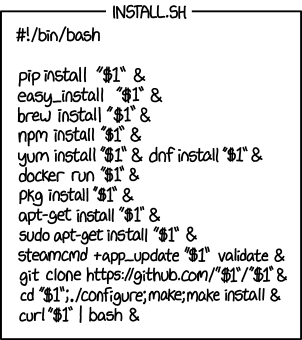
$ mpm --xkcd install markdown
Installation priority: pip > brew > npm > dnf > apt > steamcmd
warning: pip does not implement search operation.
markdown existence unconfirmed, try to directly install it...
Install markdown package with pip...
(...)
Audit existing installations
When the same package is already installed through more than one manager, list every duplicate with:
$ mpm list --duplicates
╭────────────┬──────┬─────────┬───────────────────╮
│ Package ID │ Name │ Manager │ Installed version │
├────────────┼──────┼─────────┼───────────────────┤
│ blah       │      │ cargo   │ 0.0.0             │
│ blah       │      │ gem     │ 0.0.2             │
│ blah       │      │ npm     │ 5.2.1             │
│ coverage   │      │ pip     │ 6.4.1             │
│ coverage   │      │ pipx    │ 6.4.1             │
│ six        │      │ brew    │ 1.16.0_2          │
│ six        │      │ pip     │ 1.16.0            │
╰────────────┴──────┴─────────┴───────────────────╯
7 packages total (pip: 2, brew: 1, cargo: 1, gem: 1, npm: 1, pipx: 1, cask: 0).
Removing every copy at once is a single command:
$ mpm remove blah
(...)
Successfully uninstalled blah-0.0.0
✓ blah removed from cargo
(...)
Successfully uninstalled blah-0.0.2
✓ blah removed from gem
(...)
Successfully uninstalled blah-5.2.1
✓ blah removed from npm
Removed 3/3 packages
Or target a specific duplicate by routing through one manager:
$ mpm --pip uninstall six
(...)
Todo
Add an --installed boolean flag to search to reduce the searched packages to those already installed. (installed itself now accepts a QUERY argument to filter its own listing.)
See also
Snapshot and export — snapshot the resolved installation set after deduplication.
Configuration — pin a preferred manager order so duplicates resolve consistently across runs.